Author: TakechanSoft

  • Delete when you post from Twitter menu AppStore link automatically embedded(Specification changes)About(2015/12/18Update)

    以下のお知らせでお伝えしたv2.03は、2015/12/18に無事リリースされました今後はv2.03をお使いください

    以下の情報は仕様変更の経緯としてそのまま残しておきます


    In the send to menu in Photo-Eraser[Twitter]メニューからツイートした場合v2.02までは「Click here」で紹介している通りAppStoreサイト(Photo-Eraser page)へのリンクを自動的に埋め込ませて頂いておりましたがNext version.(v2.03)以降はこのAppStoreサイトへのリンクを削除させて頂くことにしました

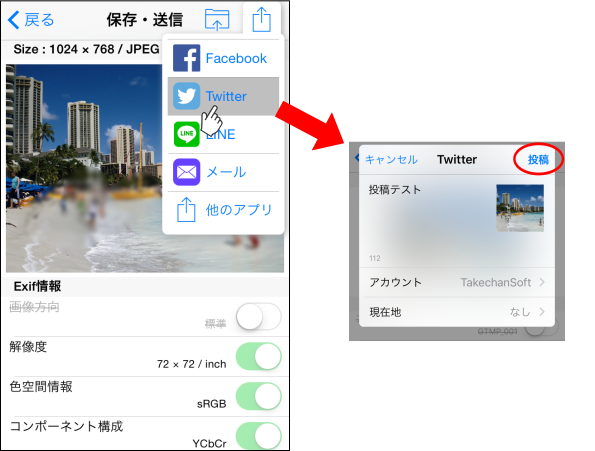
    [Twitter and then post in the v2.03]
    info017-1
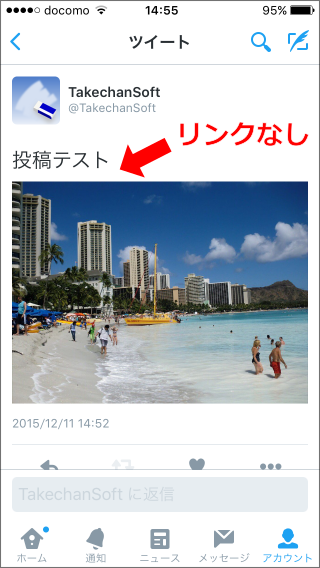
    [After posting Twitter screen]
    info017-2

    [Changed the background]
    冒頭のリンク先ページでもご紹介させて頂いている通りリンク埋め込みなしでツイートしたい方は、[Other apps]メニューからツイートすることでリンクなしのツイートができるようにしておりましたしかし、10月中旬頃よりこの方法でツイートした場合「Click here」で説明しているように不正な内部ファイル名が埋め込まれる現象が発生しておりましたこの現象は他のアプリでも同様に発生しているもので公式Twitterアプリの修正を待つしかありませんこのため私共からもTwitter社に報告しその修正を待っておりましたが、1カ月以上待っても修正される気配がない状況です
    このような状況で皆様にこれ以上ご不便をおかけするわけにはいかないと考え、To be changed to remove an embedded link AppStore site.。これにより、Is all that is posted to Twitter[Twitter]I would like to use the menu well by our。

    [Release date]
    Modified app(v2.03)teeth、既にAppleに審査依頼済で現在審査開始待ち中ですAppleの審査を通過するには通常7日から10日程度の期間を必要としますがiOS9.2がリリースされた直後でもあり年末に向けてアプリの更新が混み合うことも予想されております遅くても年内には審査が通過すると考えておりますがもうしばらくお待ちください

    [To ask]
    Twitter投稿時のアプリリンク自動埋め込みはアプリの知名度向上のために他の無料アプリでも広く行われている手法でありPhoto消しゴムの知名度向上にも大きな役割を果たしておりました今回の仕様変更によりアプリ紹介手段が一つ失われることになりダウンロードランキングの下落に繋がらないか若干心配ではありますがそれよりも皆様が気持よく使って頂けることの方が重要であると考えリンクを削除することにしましたもしよろしければ、In addition, very helpful and everyone in your social networks introduce good use for this app.ご協力の程よろしくお願いいたします

    (Change history)
    2015/12/11 Initial creation
    2015/12/18 v2.03 release update
  • 2015In October 22, notice.

    Thank you for using the “Photo Rubber” habitually.

    There is a information for the user that post to twitter directly, especially the user who use “Other apps” menu to tweet.

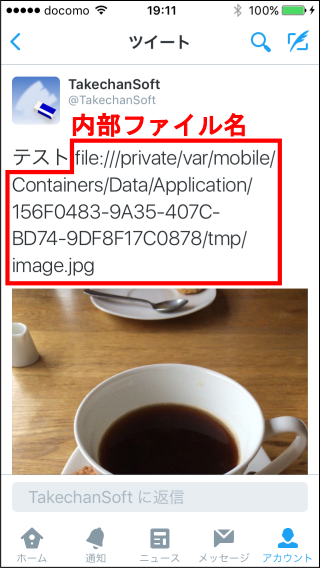
    When you tweet from “Other apps” menu, we introduced that did not come to bury the link to the AppStore site in a message in “this information” , but we confirmed that the phenomenon that inside file name called ” file://…” was buried in tweet contents today.

    If you met with that problem, please refer to “this information

    The person who tweeted directly by normal [Twitter] menu , will not meet such a problem. According to the specifications , only the link to the AppStore site will be buried .

    If you have any problem, please contact us from this link.

    Thank you in advance for your help.


    Please always use Photo Eraser.、thank you。

  • [Other apps]When posting to Twitter from the menu、Regarding the phenomenon that internal file names are displayed(2015/12/18Update)

    In the send to menu[Other apps]からTwitterアイコンを選択してツイートした場合ツイート内容に「file://~ 」という内部ファイル名が埋め込まれるとのご連絡をユーザー様から頂きその現象を確認しましたこの現象の原因と回避方法について以下にご説明します

    info016-1

    About the [source]

    この現象が発生する原因について調査したところ最近のTwitterアプリ(Genuine Twitter app Twitter Inc. releases)のアップデートが影響していることが判明しました

    純正Twitterアプリは約1週間単位で頻繁にアップデートされているためこの現象が発生し始めるアプリのバージョンを特定することはできませんでしたが少なくとも2015/9/9リリースのv6.36をインストールしている状態ではこの現象は発生せず、2015/10/19リリースのv6.39をインストールすると発生することを確認しております

    Also、この現象はPhoto消しゴム特有のものではなくPhoto消しゴムの[Other apps]選択時に表示されるシステムメニューと同じメニューを使っている別のアプリでも同様の現象が発生することを確認しております

    [How to avoid(2015/12/18Update)】

    Photo消しゴムをv2.03以上にアップデートし通常の[Twitter]メニューから投稿してください
    prior to v2.02[Twitter]メニューからの投稿時にAppStoreサイトへのリンクを自動的に埋め込ませて頂いておりましたがv2.03よりこのリンク埋め込みを削除しましたこれにより[Other apps]メニューを使用しなくても通常の[Twitter]メニューですっきりと投稿できるようになりました

    (Update history)
    2015/10/22 Initial creation
    2015/12/18 v2.03 release update with [workaround]

  • 2015In October 12 announcement.

    Thank you for using the “Photo Rubber” habitually.

    Photo Rubber Version2.02 has been released on 2015/10/12 Monday.

    This version plans stabilization using latest SDK from each companies corresponding to iOS9.

    If you feel some unsatble on iOS9, please update to this release by all means.
    Other than that, we also recommends to use the latest release.

    If you want to check the changes in this version, please see Changes to Photo Rubber Version2.02.

    If you have any problem, please contact us from this link.

    Thank you in advance for your help.


    Please always use Photo Eraser.、thank you。

  • Changes to Photo-Eraser Version2.02

    2015/10/12(Moon)にPhoto消しゴム Version2.02がリリースされました

    This version is、iOS9に対応した各社最新のSDKを使用して再ビルドし動作の安定化を図っています

    The main changes are:、It is as follows。

    • iOS9に対応した各社最新SDKを使用して再ビルドしました
    • 言語設定が日本語で地域設定が日本でない場合一部メッセージが英語になる問題を修正しました
    • 通信障害発生時やメモリ不足発生時に落ちる可能性がある部分を修正しました
    • インタースティシャル広告の表示前にサイレントスイッチの確認を促すメッセージを追加しました

    iOS9になって少し動作が不安定になったかなと感じられた方はぜひ本リリースをお試しください
    それ以外の方も最新リリースを利用されることをお勧めします

    Thank you for your continued support of Photo Eraser.。

  • 2015September 23, notice.

    Thank you for using the “Photo Rubber” habitually.

    Photo Rubber Version2.01 has been released on 9/23 Wednesday.

    When you operate Photo Rubber in iOS9 , please update to this version.

    This version is urgently update for iOS9. So there is no big additional feature.

    If you want to check the changes in this version, please see Changes to Photo Rubber Version2.01.

    If you have any problem, please contact us from this link.

    Thank you in advance for your help.


    Please always use Photo Eraser.、thank you。

  • Changes to Photo Rubber Version2.01

    2015/9/23"Photo Eraser Version 2.01" was released on。

    This version is、Emergency release for iOS9 compatibility、No major feature additions。
    The main changes are:、It is as follows。

    • Fixed an issue where some Japanese display became English on iOS9.。
    • Fixed the part where the character width was insufficient due to the iOS9 system font change。
    • Compatible with iOS9's new app calling function、Moving/returning to the settings screen or Safari is now smoother.。

    For those using iOS9、Please update to this version.。

    Thank you for your continued support of Photo Eraser.。

  • 2015September 15-day notice.

    Thank you for using the “Photo Rubber” habitually.

    We will inform you about the correspondence situation of iOS9 where release is planned on 9/16 Wednesday.

    When you operate Photo Rubber v2.00 in iOS9 , the basic functions such as shading off processing or transmission processing work without a problem , but we confirm that the following slight malfunction occurs in iOS9 beta release beforehand.

    • Some Japanese messages are English e.g. Exif information.
    • Because System Font is changed , there is the part which some messages cannot finish fitting into in a frame.

    Next revision has been already made about this problem , and it is during waiting for examination of Apple now , but it is expected that I need periods more than everyday double for examination because new OS correspondence release of each application occurs in large quantities at this time before and after the major version up of the OS .

    I am sorry to cause you inconvenience , but please already wait until iOS9 perfection correspondence for a while.

    If you have any problem, please contact us from this link.

    Thank you in advance for your help.


    Please always use Photo Eraser.、thank you。

    • Exif information items etc.、Some Japanese messages will be displayed in English。
    • Because the system font has changed、Some messages may not fit within the frame and may be cut off.。

  • 2015August 29 announcement.

    Thank you for using the “Photo Rubber” habitually.

    From 8/6 Thursday to 8/10 Monday, the application has been crashed frequently. Now it is stable and works by stopping the delivery of the advertisement to become the problem. Please use it in peace.

    In addition , for a characteristic that the Photo Rubber does not drop a picture quality and can shade off , it is for application to need a large quantity of memory. Therefore , it is rebooted forcibly when you return to Photo Rubber using other application during use of Photo Rubber in a few minutes because memory is lacking in it, and the image which you editing may be reset. So if you leave the editing for a while, you should save once.

    If you have any problem, please contact us from this link.

    Thank you in advance for your help.


    Please always use Photo Eraser.、thank you。

  • 2015August 10-day notice.

    Thank you for using the “Photo Rubber” habitually.

    Several users give a report that Photo Rubber have begun to fall down from 8/6 to us. We can not elucidate the detailed cause, but there is the advertisement company which raised the advertisement delivery ratio from 8/6 until the daytime of today and supposes it when the indication of the advertisement might have some kind of influences.

    Therefore, We stopped delivery of advertisement company just to make sure from today.

    User who met with a phenomenon to come off after 8/6 stops Photo Rubber once if there and is happy when you work normally after having rebooted or can try application. If user to fall after reboot as ever is broken , please contact us from this link.

    Thank you in advance for your help.


    Please always use Photo Eraser.、thank you。