Month: May 2015

  • 2015May 29 announcement [for version-up user].

    Thank you for updating the “Photo Rubber”.

    We supported original resolution of iPad and iPhone6 and supported landscape mode for all devices from this version .

    Also you can change the blur strength quickly, and wipe out the blur.

    As for other detailed changes, please see What’s new in PhotoRubber Version2.00.


    Please always use Photo Eraser.、thank you。

  • 2015March 29 announcement [new users].

    Thank you for downloading the “Photo Rubber”.

    If we have important update information in future, we will inform you by this “Notification” feature.

    We will recommend to confirm the photograph informaton with “Photo Rubber” always for your comfortable, if you do not need to edit the photograph.
    Please use it habitually.

    As for the detailed information and the frequently asked question , please see here.


    Please download Photo Eraser、thank you。

  • [Sending function] A link to the AppStore site is automatically embedded in the tweet content.、Can I post this link without embedding it??(2015/12/18Update)

    Photo eraser from v2.03、The automatic embedding of links to the AppStore site has been removed.、Please use v2.03 or higher from now on.。
    Specification change history "Click herePlease see。

    Below is、This is old information from v2.02 or earlier.。I will keep this as reference information for previous versions.。


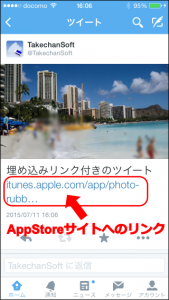
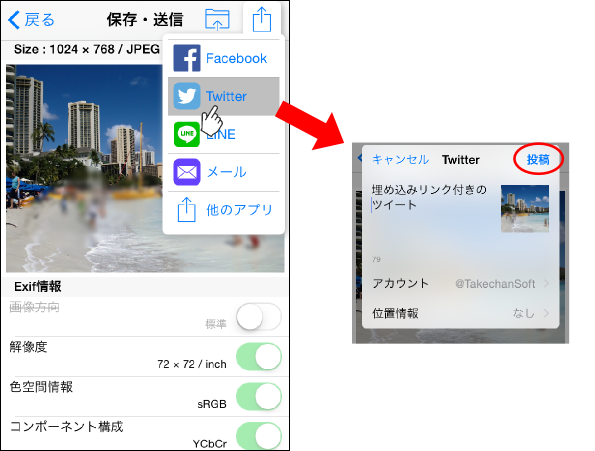
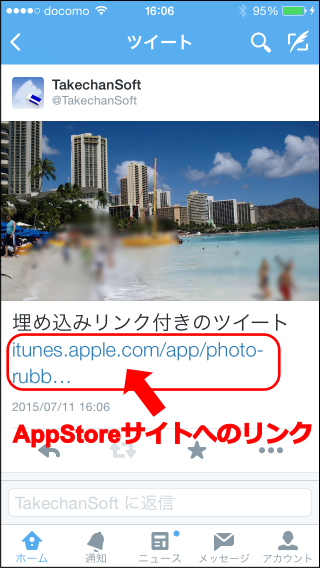
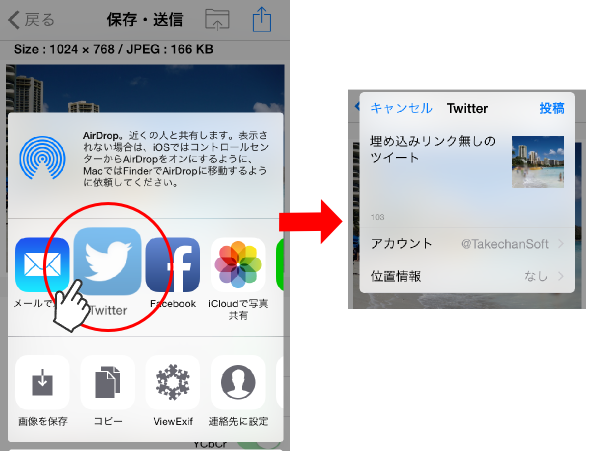
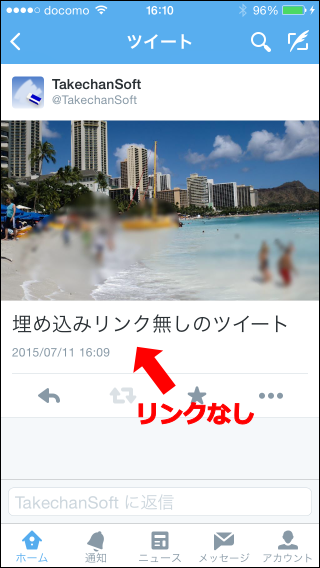
    When posting to Twitter from the Photo Eraser's send menu、AppStore site as below(Photo-Eraser page)The link will be automatically embedded in the tweet content.。

    [Select Twitter from the Photo-Eraser's send to menu, send]
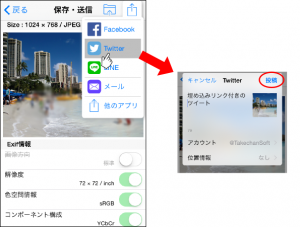
    info013-1

    [View on Twitter]
    info013-2

    This link is、It has played a major role in increasing the popularity of Photo erasers.、If you don't mind, please just tweet with the link.、That's very helpful(Embedding these links、Widely used in other free apps)。

    If you tweet with a link、There are also benefits for users such as:。

    • For acquaintances who carelessly post photos without worrying about the privacy of others、We can casually let you know that there is such a useful app without making a big deal about it.、It will be easier to ask your friends to respect your privacy.。
    • My tweet was posted using a privacy protection app.、You can subtly show that you are paying close attention to the privacy of others.。

    but、I think some people may be reluctant to have links embedded without permission.。For this reason、Photo Eraser offers another way to tweet without embedding this link。

    If you want to tweet without embedding a link、Please follow the steps below to post。
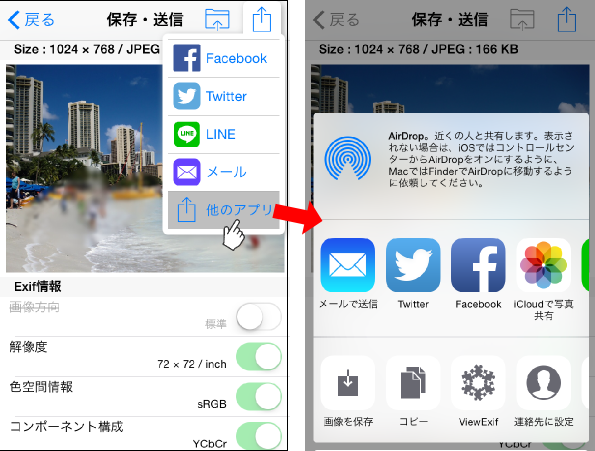
    first、Select "Other apps" in the send menu。

    [Photo-Eraser send menu select "other apps"]
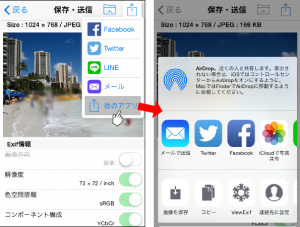
    info013-3

    Then、An icon that allows you to send will appear.、From there select Twitter。

    [Sends a Twitter icon]
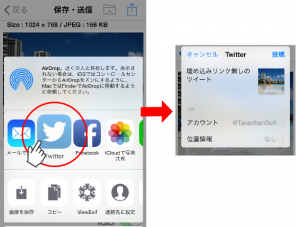
    info013-4

    If you send from here、Links to AppStore will not be embedded。

    [View on Twitter]
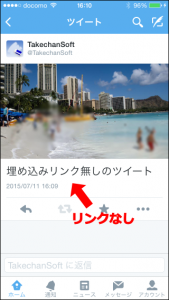
    info013-5

    In addition、For those using iOS8.0 to 8.2、Twitter icon does not appear in the list of icons that can be sent。We apologize for the inconvenience, but、If you are using iOS8.0~8.2, please update your iOS version to the latest version.(7/11The current version 8.4.)Please update to。

    (Update history)
    2015/5/29 Initial creation
    2015/7/11 Renewal
    2015/12/18 Update due to specification changes

  • How to call Photo Eraser from the photos app

    Photo eraser、Photo editing extension, the latest feature of iOS8(Photo Editing Extension)And market share expansion(Share Extension)It corresponds to、Photo eraser functionality can be called from the standard "Photos" app。

    First release of this feature(Version1.10)at the time of、On the ASCII iPhonePLUS website、We have published an article that explains in detail how to use the Photo Eraser from the Photos app.、Please take a look。

    Photo Eraser responds to latest iOS8! Blur also resize Exif check all you can from the photos app

    In addition、In Version 2.00、The button name for sending images to Photo Eraser has been changed from "Share with Photo Eraser" to "Send to Photo Eraser"。For details, seeOn the Send button to a Photo EraserPlease see the explanation of。

    Also、Photo editing extension(Photo Editing Extension)cannot use large memory、When editing large images、Out of memory message may appear。If you set automatic resizing, you can edit without stress.。For more details、FAQ"Out of memory error often occurs with Photo Eraser called from the Photos app.。Is there any countermeasure??” for a detailed explanation, please refer to it as well.。

  • On the Send button to a Photo Eraser

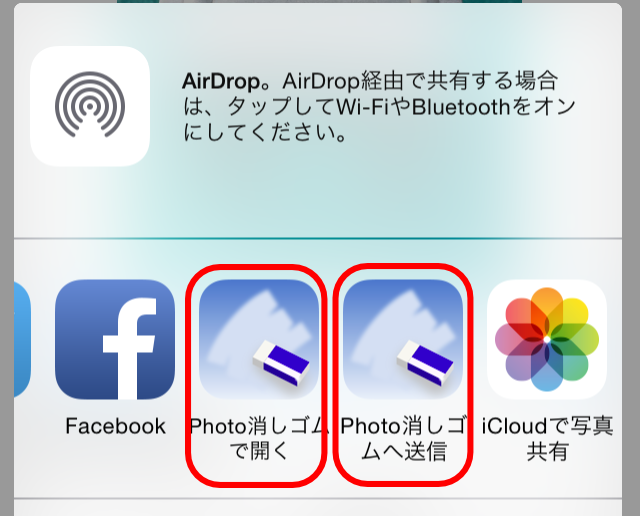
    in the send menu of other apps that process photos and images.、If either the "Open in Photo Eraser" or "Send to Photo Eraser" button is displayed as shown below,、You can pass images directly to Photo Eraser。Depending on the app, both types of buttons may be displayed at the same time.。Here we will explain how to use them.。
    info011-01

    • Open Photo Eraser

      This button is basically displayed in the send menu of apps that have the ability to pass images to other apps.。
      By tapping this button、Photo eraser will be automatically started.、You can now edit the target image with the Photo eraser。

    • Send to a Photo Eraser

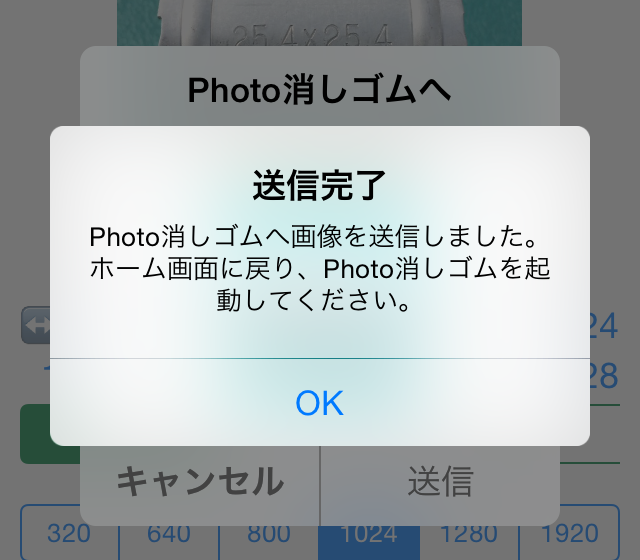
      This button、Displayed in the send menu of apps that support the image sharing function on devices using iOS 8.0 or higher.。Just like the previous button, this button can also pass the target image to the Photo eraser.。however、For those using iOS8.3 or higher、Because Photo Eraser cannot be started automatically、When you tap this button, the following message will be displayed。
      info011-02
      If you see this message、We apologize for the inconvenience, but please return to the home screen and start Photo Eraser manually.。Then、The image you sent will be automatically loaded.、You can now edit with Photo Eraser。

      If both the "Open in Photo Eraser" and "Send to Photo Eraser" buttons are displayed、It is better to use "Open with Photo Eraser"、(iOS8.3 or more)I think it's easy to use because you don't have to worry about starting it manually.。In the standard "Photo" app, only "Send to Photo Eraser" is displayed.、Please use this。


      [Supplemental commentary]
      Why can't Photo Eraser start automatically from iOS8.3?、For those who want to know the reason for the functionality down、It's a bit technical, but、The process is explained below.。

      Originally as Apple、The image sharing function is a function that sends data to other systems.、They seem to think that it is not recommended to use this feature to switch the app you are currently using to another app without permission.。When you tap the share function button on Twitter or Facebook、A post-only screen appears.、Once the post is complete、You can now return to your original app and continue working with it.。It will not switch to the Twitter app or Facebook app without permission.。This means that the share function is recommended to behave like this.。
      However,、From iOS8.0 to 8.2, there is a method to launch the parent app from the Share Extension module.、Including Photo eraser、Apps that used it were able to pass Apple's review and be released.、With iOS8.3, OS restrictions have been strengthened.、That method is no longer available。For this reason、How to edit images sent to Photo Eraser on iOS8.3 or later、Users are now left with no choice but to launch Photo Eraser themselves。

      Apple has such a policy.、On the other hand, there are two buttons with different design principles: the share function button and the "Open with" app launch button.、Displayed with the same icon in the same menu、I think this results in unnecessary confusion for users.。I apologize for the specification being difficult to understand.、Thank you for your understanding.。

  • New features of PhotoRubber Version2.00

    Photo Eraser Version2.00、Incorporating the opinions of everyone who reviews、We have implemented the following measures:。

    • iPad,Compatible with the original resolution of iPhone6 ​​and iPhone6 ​​Plus、The editing screen can now be used more widely.。
    • Compatible with landscape mode on all devices including iPhone、Horizontal photos are now easier to edit。
    • Display the sub toolbar in blur mode、Brush size and blur strength can now be easily changed。
    • The previous "Eraser" mode has been renamed to "Colored Blur" mode.、Added a new "wipe" mode。
      When you trace a photo in wipe mode、Wipe the blurred area、You can return to the state before blurring。
    • You can now import photos from your photo library's "My Photo Stream"。
    • Review the sending process、Separate the "Save" and "Send Email" buttons、Save and send procedures are now easier to understand。
    • camera button、Separate photo library load button、It's now easier to understand how to load new images。
    • Display a sample image on the start screen、You can now explain how to use it with a video。
    • Animate menu appearance、We have devised a way to make it more fun to use.。
    • Change the eraser design of the app icon、It has become three-dimensional。
    • Supports push notifications、We are now able to provide you with the latest information。

    We hope that you will continue to use Photo Eraser.、Thank you very much。