Category: Reference information

  • Changes to Photo-Eraser Version2.05

    "Photo Eraser Version 2.05" compatible with iOS11 and iPhoneX was released on November 26, 2017。

    The main changes are:、It is as follows。

    • Fixed an issue where the menu for sending to Twitter and Facebook would no longer be displayed.。Starting with iOS11, you will need to install the official Twitter app and official Facebook app to display the Twitter and Facebook sending menus.。
    • photos taken with the camera since the iPhone7(HEIF形 expression)Fixed a bug where the image was mistakenly recognized as PNG format and displayed as having no photo information.。
    • photos taken with the camera since the iPhone7(HEIF形 expression)Fixed an issue where it was not possible to edit and save via the "Photos" app.。
    • Fixed an issue where the screen layout would shift when using the Photo eraser function from the Photos app on iPhoneX.。
    • The default value for aspect ratio selection in trimming mode has been changed to "Aspect Ratio Free"。

    For those using iOS11、Please update to this version.。

    Thank you for your continued support of Photo Eraser.。

  • due to the upgrade to iOS11 failure

    When using Photo Eraser Version 2.04 on an iPhone updated to iOS11、It is currently known that the following problems occur:。

    • Twitter,Send to Facebook menu is not displayed。
    • photos taken with the camera since the iPhone7(HEIF形 expression)When I load、I mistakenly recognized it as PNG format.、Photo information(EXIF information)May be displayed as None。
    • photos taken with the camera since the iPhone7(HEIF形 expression)You may not be able to edit and save via the "Photos" app.。
    • When using the Photo eraser function from the Photos app on iPhoneX, the screen layout may shift in some areas.。

    We have already created a corrected version for these defects.、To obtain AppStore publishing permission、We are currently awaiting Apple's review.。

    We will inform you of the causes and temporary workarounds for each problem.。We apologize for the inconvenience.、If you are having trouble,、Please try the temporary workaround until the iOS11 compatible version is released.。


    Twitter,Facebook send to menu is not displayed

    Until iOS10, Twitter and Facebook were treated specially on iOS.、I managed my account using the Settings app.、Special treatment is no longer available from iOS11、You can no longer manage your account in the Settings app。As a result of this, when Photo Eraser checks the account registration status of Twitter or Facebook, it will recognize that the account is not registered.、Menu is no longer displayed。

    As a temporary workaround until the iOS11 compatible version is released,、Select "Other apps" from the send menu、Please select Twitter or Facebook from the system share menu.。

    In iOS11 compatible version、The menu will now be displayed when the official Twitter app or official Facebook app is present.。


    photos taken with the camera since the iPhone7(HEIF形 expression)When I load、I mistakenly recognized it as PNG format.、Photo information(EXIF information)No display problem
    photos taken with the camera since the iPhone7(HEIF形 expression)Can't save edits via the "photos" app problem

    When taking a photo with the iOS 11 camera app using an iPhone 7 or later model、Previously, files were saved in JPEG format.、Now saved in a new file format called HEIF。Due to this effect, Photo Eraser cannot correctly recognize HEIF format files.、I misunderstood it as PNG format and processed it.、Losing photo information、There is a problem where saving fails.。
    (About HEIF format reference articles)
    http://photolog.aiko15.com/10141/

    As a temporary workaround until the iOS11 compatible version is released,、Launch the Settings app from the home screen、[Camera]-[Format]-[Incompatible override]If you select、When shooting with the camera, it will be saved in the conventional JPEG format.、You can now edit with the Photo eraser as usual.。For photos that have already been taken in HEIF format,、Must be converted to JPEG format。There are several conversion methods、If you need it, please refer to the following article。
    (How to convert to JPEG from HEIF format)
    http://photolog.aiko15.com/11011/

    In iOS11 compatible version、If you recognize that the file is in HEIF format、Convert and handle it in JPEG format in Photo Eraser。This results in、Photo information as before(EXIF information)You can now check and delete、Saving and sending processes are also done in JPEG format.。


    When you use Photo-Eraser function from the photo app by iPhoneX some screen layout bug

    This only occurs when using iPhoneX and calling up Photo Eraser in the editing function of the "Photos" app.。The "Photos" app works in full screen on iPhone、Photo eraser is not compatible with new screen size、There are some layout discrepancies.。
    This problem is、No workaround has been found so far。This is not a fatal problem such as not being able to edit.、We apologize for the inconvenience, but please wait until the iOS 11 compatible version is released.。

  • Changes to Photo-Eraser Version2.04

    "Photo Eraser Version 2.04" compatible with iOS10 was released on September 23, 2016.。

    The main changes are:、It is as follows。

    • Fixed a bug that caused a save error when using the Photo eraser from the editing function of the "Photo" app.。
    • Added send menu to Instagram。

    For those using iOS10、Please update to this version.。

    Thank you for your continued support of Photo Eraser.。

  • Changes to Photo-Eraser Version2.03

    2015/12/18(Gold)Photo Eraser Version 2.03 was released on。

    In this release、Removed the link to the AppStore that was automatically embedded when posting from the Twitter menu.、Now you can tweet clearly。

    The main changes are:、It is as follows。

    • Removed the link to the AppStore that was automatically embedded when posting on Twitter。
    • Rebuilt using the latest SDKs from each company.。
    • When the Undo/Redo counter display is 3 digits or more、Fixed an issue where numbers would not display correctly。

    For those who posted on Twitter using Photo Eraser、Please try it。

    Thank you for your continued support of Photo Eraser.。

  • Delete when you post from Twitter menu AppStore link automatically embedded(Specification changes)About(2015/12/18Update)

    v2.03, which was announced in the following notice, is、2015/12/18was successfully released on。In the future、Please use v2.03。

    The following information is、I will leave it as it is as a history of the specification change.。


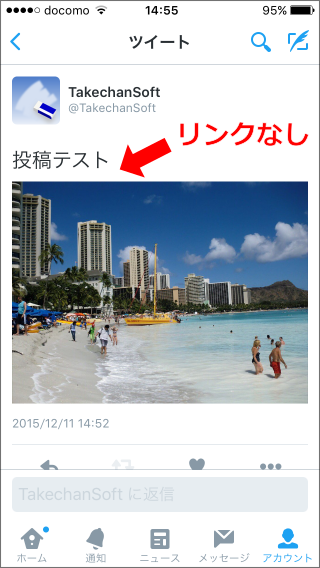
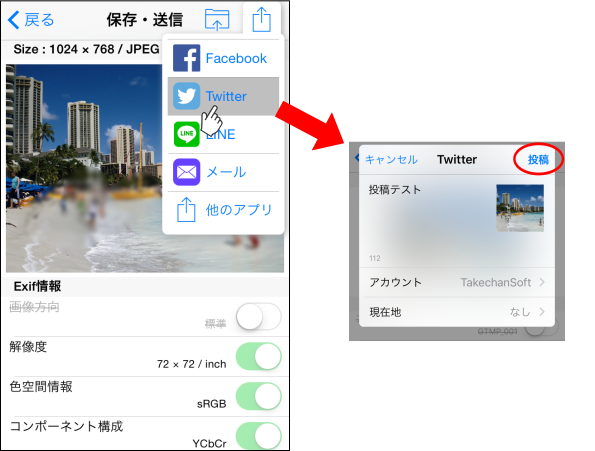
    In the send to menu in Photo-Eraser[Twitter]If you tweet from the menu、Until v2.02, “Click hereAs introduced in、AppStore site(Photo-Eraser page)We have automatically embedded the link to、Next version.(v2.03)From then on、We have decided to remove the link to this AppStore site.

    [Twitter and then post in the v2.03]
    info017-1
    [After posting Twitter screen]
    info017-2

    [Changed the background]
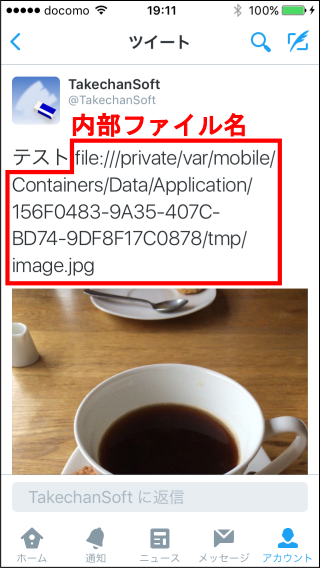
    As introduced on the linked page at the beginning、If you want to tweet without embedding a link、[Other apps]By tweeting from the menu, you can tweet without a link.。but、10From around mid-month、If you tweet using this method, “Click hereAs explained in ``, a phenomenon occurred where an invalid internal file name was embedded.。This phenomenon also occurs in other apps as well.、All we can do is wait for the official Twitter app to fix it.。For this reason、We also reported this to Twitter.、I've been waiting for that fix、1Even after waiting for more than a month, there is no sign that it will be fixed.。
    In this situation、We do not want to cause any more inconvenience to you.、To be changed to remove an embedded link AppStore site.。This results in、Is all that is posted to Twitter[Twitter]I would like to use the menu well by our。

    [Release date]
    Modified app(v2.03)teeth、I have already requested a review from Apple.、Currently waiting for review to start。How to pass Apple's inspection、Usually it takes about 7 to 10 days.、It was also just after iOS9.2 was released.、It is expected that app updates will become more crowded towards the end of the year.。I believe that the examination will pass within this year at the latest.、Please wait for a while。

    [To ask]
    Automatic embedding of app links when posting on Twitter、To improve the popularity of the app、This is a method widely used in other free apps.、It also played a major role in increasing the popularity of Photo erasers.。Due to this specification change, one means of introducing the app will be lost.、I'm a little worried that it might lead to a decline in download rankings, but、We believe that it is more important that everyone can use the product comfortably.、I decided to remove the link。If you don't mind、In addition, very helpful and everyone in your social networks introduce good use for this app.。Thank you for your cooperation.。

    (Change history)
    2015/12/11 Initial creation
    2015/12/18 v2.03 release update

  • [Other apps]When posting to Twitter from the menu、Regarding the phenomenon that internal file names are displayed(2015/12/18Update)

    In the send to menu[Other apps]If you tweet by selecting the Twitter icon from、Tweet contents include “file”://We received a notification from a user that the internal file name "~" will be embedded.、I confirmed the phenomenon。What causes this phenomenon and how to avoid it?、I will explain below。

    info016-1

    About the [source]

    After investigating the cause of this phenomenon,、Recent Twitter apps(Genuine Twitter app Twitter Inc. releases)It turned out that the update was affecting the。

    Genuine Twitter app、It is updated frequently, approximately every week.、I haven't been able to pinpoint the version of the app where this behavior starts to occur.、This phenomenon does not occur at least when v6.36 released on September 9, 2015 is installed.、2015/10/19We have confirmed that this problem occurs when installing release v6.39.。

    Also、This phenomenon is not unique to Photo erasers.、Photo eraser[Other apps]We have confirmed that the same phenomenon occurs with other apps that use the same menu as the system menu that is displayed when selecting.。

    [How to avoid(2015/12/18Update)】

    Update Photo Eraser to v2.03 or higher.、normal[Twitter]Please post from the menu。
    prior to v2.02[Twitter]A link to the AppStore site was automatically embedded when posting from the menu.、This link embedding has been removed from v2.03。This results in[Other apps]without using the menu、normal[Twitter]You can now post clearly using the menu。

    (Update history)
    2015/10/22 Initial creation
    2015/12/18 v2.03 release update with [workaround]

  • Changes to Photo-Eraser Version2.02

    2015/10/12(Moon)Photo Eraser Version 2.02 was released on。

    This version is、Rebuild using each company's latest SDK compatible with iOS9.、We are working to stabilize the operation.。

    The main changes are:、It is as follows。

    • Rebuilt using each company's latest SDK compatible with iOS9。
    • If the language setting is Japanese and the regional setting is not Japan、Fixed an issue where some messages were in English。
    • Fixed a part that could crash when a communication failure or memory shortage occurred.。
    • Added a message prompting you to confirm the silent switch before displaying interstitial ads。

    For those who feel that the operation has become a little unstable after upgrading to iOS9、Please try this release。
    Others too、We recommend using the latest release。

    Thank you for your continued support of Photo Eraser.。

  • Changes to Photo Rubber Version2.01

    2015/9/23"Photo Eraser Version 2.01" was released on。

    This version is、Emergency release for iOS9 compatibility、No major feature additions。
    The main changes are:、It is as follows。

    • Fixed an issue where some Japanese display became English on iOS9.。
    • Fixed the part where the character width was insufficient due to the iOS9 system font change。
    • Compatible with iOS9's new app calling function、Moving/returning to the settings screen or Safari is now smoother.。

    For those using iOS9、Please update to this version.。

    Thank you for your continued support of Photo Eraser.。

  • How to call Photo Eraser from the photos app

    Photo eraser、Photo editing extension, the latest feature of iOS8(Photo Editing Extension)And market share expansion(Share Extension)It corresponds to、Photo eraser functionality can be called from the standard "Photos" app。

    First release of this feature(Version1.10)at the time of、On the ASCII iPhonePLUS website、We have published an article that explains in detail how to use the Photo Eraser from the Photos app.、Please take a look。

    Photo Eraser responds to latest iOS8! Blur also resize Exif check all you can from the photos app

    In addition、In Version 2.00、The button name for sending images to Photo Eraser has been changed from "Share with Photo Eraser" to "Send to Photo Eraser"。For details, seeOn the Send button to a Photo EraserPlease see the explanation of。

    Also、Photo editing extension(Photo Editing Extension)cannot use large memory、When editing large images、Out of memory message may appear。If you set automatic resizing, you can edit without stress.。For more details、FAQ"Out of memory error often occurs with Photo Eraser called from the Photos app.。Is there any countermeasure??” for a detailed explanation, please refer to it as well.。

  • On the Send button to a Photo Eraser

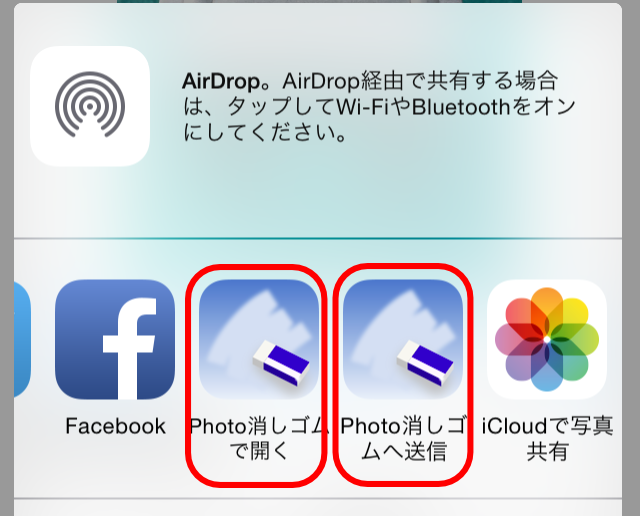
    in the send menu of other apps that process photos and images.、If either the "Open in Photo Eraser" or "Send to Photo Eraser" button is displayed as shown below,、You can pass images directly to Photo Eraser。Depending on the app, both types of buttons may be displayed at the same time.。Here we will explain how to use them.。
    info011-01

    • Open Photo Eraser

      This button is basically displayed in the send menu of apps that have the ability to pass images to other apps.。
      By tapping this button、Photo eraser will be automatically started.、You can now edit the target image with the Photo eraser。

    • Send to a Photo Eraser

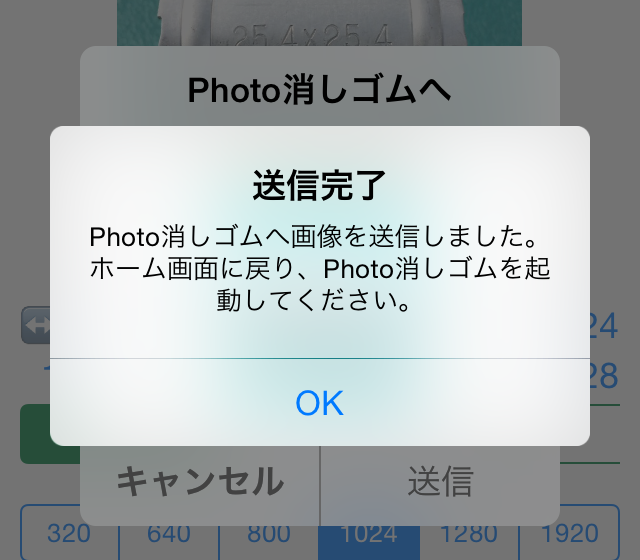
      This button、Displayed in the send menu of apps that support the image sharing function on devices using iOS 8.0 or higher.。Just like the previous button, this button can also pass the target image to the Photo eraser.。however、For those using iOS8.3 or higher、Because Photo Eraser cannot be started automatically、When you tap this button, the following message will be displayed。
      info011-02
      If you see this message、We apologize for the inconvenience, but please return to the home screen and start Photo Eraser manually.。Then、The image you sent will be automatically loaded.、You can now edit with Photo Eraser。

      If both the "Open in Photo Eraser" and "Send to Photo Eraser" buttons are displayed、It is better to use "Open with Photo Eraser"、(iOS8.3 or more)I think it's easy to use because you don't have to worry about starting it manually.。In the standard "Photo" app, only "Send to Photo Eraser" is displayed.、Please use this。


      [Supplemental commentary]
      Why can't Photo Eraser start automatically from iOS8.3?、For those who want to know the reason for the functionality down、It's a bit technical, but、The process is explained below.。

      Originally as Apple、The image sharing function is a function that sends data to other systems.、They seem to think that it is not recommended to use this feature to switch the app you are currently using to another app without permission.。When you tap the share function button on Twitter or Facebook、A post-only screen appears.、Once the post is complete、You can now return to your original app and continue working with it.。It will not switch to the Twitter app or Facebook app without permission.。This means that the share function is recommended to behave like this.。
      However,、From iOS8.0 to 8.2, there is a method to launch the parent app from the Share Extension module.、Including Photo eraser、Apps that used it were able to pass Apple's review and be released.、With iOS8.3, OS restrictions have been strengthened.、That method is no longer available。For this reason、How to edit images sent to Photo Eraser on iOS8.3 or later、Users are now left with no choice but to launch Photo Eraser themselves。

      Apple has such a policy.、On the other hand, there are two buttons with different design principles: the share function button and the "Open with" app launch button.、Displayed with the same icon in the same menu、I think this results in unnecessary confusion for users.。I apologize for the specification being difficult to understand.、Thank you for your understanding.。