Day: September 6, 2014

  • Development impression

    This article、This is the developer's personal impressions.。Please read only if you are interested.。


    The world is buzzing with talk about iPhone 6 and iOS 8、We have finally released a new app。
    Honestly, this app was more difficult than I expected.。There was an incident where the development machine Mac broke during the process.、While doing other things,、It took more than half a year from the time I came up with the idea to the time I released it.。

    The beginning was simple。I personally don't post much on SNS.、I have a photo I want to send、I didn't want to show part of the photo to the public.、I was looking for an app to easily blur that part.。

    The iPhone is fully loaded with apps.、You'll soon find a free and easy app to blur.。I also thought it would be nice to be able to delete the shooting date and time and GPS information, so I looked for it...
    The blurring process is not easy to use and you cannot blur it as you imagined.、While editing the blur, a full-page advertisement suddenly appears and gets in the way.、It has a lot of functions such as brush shape and pattern selection, so you can do anything.、I don't really know how to blur it.、When I tried to save the edited image, it was resized to a smaller size than originally.、The image quality of the unblurred parts is poor.、Also, the shooting date and time and GPS information have been deleted.、You may have no idea what information was originally included or what information was deleted.、It was all like that。

    Huh?、Something like this? Well then、Maybe I should make it myself?。It's not easy if you just blur the place you traced with your finger.?Also, check and delete Exif information such as shooting date and time and GPS information.。If this is the case, I think we can release it in a month at the earliest.?
    And it was this development began in the wishful thinking...

    in、For now, the process of tracing an iPhone screenshot with your finger and blurring it is、Done in a few days。Whoa、I thought I could do this right away, so next time I tried to blur a photo taken with my iPhone's camera...。eating up too much memory、Instead of the app crashing, the device suddenly reset.。

    This is where I learned for the first time how difficult this type of app is.。Since iPhone photos have 8 million pixels, 1 pixel is 4 bytes, which is 32MB of data.。If I update this with blur processing in real time at the same time as the touch, the iPhone won't have the performance.。That's why I realized that everyone is editing with lower quality.。everyone、``Is this what it is??I'm sorry for saying that.。

    If、Place the display image in front of the actual image.、While touching, the display image will be blurred.、Shouldn't the actual image be blurred in the background??That's it、Also, when I started implementing it with a double layer structure thinking lightly, the processing became several times more difficult.(>_<)。Even if it is processed in the background、If you process images of more than 1M pixels at a time, operation will become unstable due to insufficient memory.、The traced area is divided into 1M pixel areas and blurred little by little.。To find this appropriate size, we process it while solving two-dimensional equations.、Solve math shape problems every day、100It felt like I had to stay and do extra lessons all the time until I got the points.。It took me about 2 months to finally get the tuning to my satisfaction.、I'm a little tired、This development has been dormant for a while.。

    after that、I suddenly thought of it、If you add a little color at the start of the touch when blurring、Wouldn't it feel like it could be erased??That's what I thought and tried it.、I named it ``Photo Eraser'' because it erases nicely.、I finished it。
    I would say finishing、There are many functions left to be done, including Undo/Redo functions.、Menu that pops up at the touch point、Resize function、Trim function、Exif information display/edit function、tutorial etc.、In the end, it took two months just for those things.。There were other things I wanted to do.、Schedule the next session、I managed to submit a review request to Apple a week before the iPhone 6 was announced.。but、There seems to be a rush of applications at this time of year.、Today I finally got it reviewed by Apple and was able to release it.。(It took 10 days after requesting a review.。)

    in the end、I just want to check and delete any privacy information when sending images.、Well, I'm having a lot of trouble.。It looks like the waterfowl is swimming comfortably on the surface of the water, but underwater it feels like they are desperately trying to maintain their balance while paddling in the water.。

    Well、Don't worry about that、No need to edit or blur、When sending images somewhere、Please check the privacy information using "Photo Eraser".!
  • [Exif confirmation] Some photo information may be saved with different values ​​from the original.。Why not just keep the original value intact??

    update

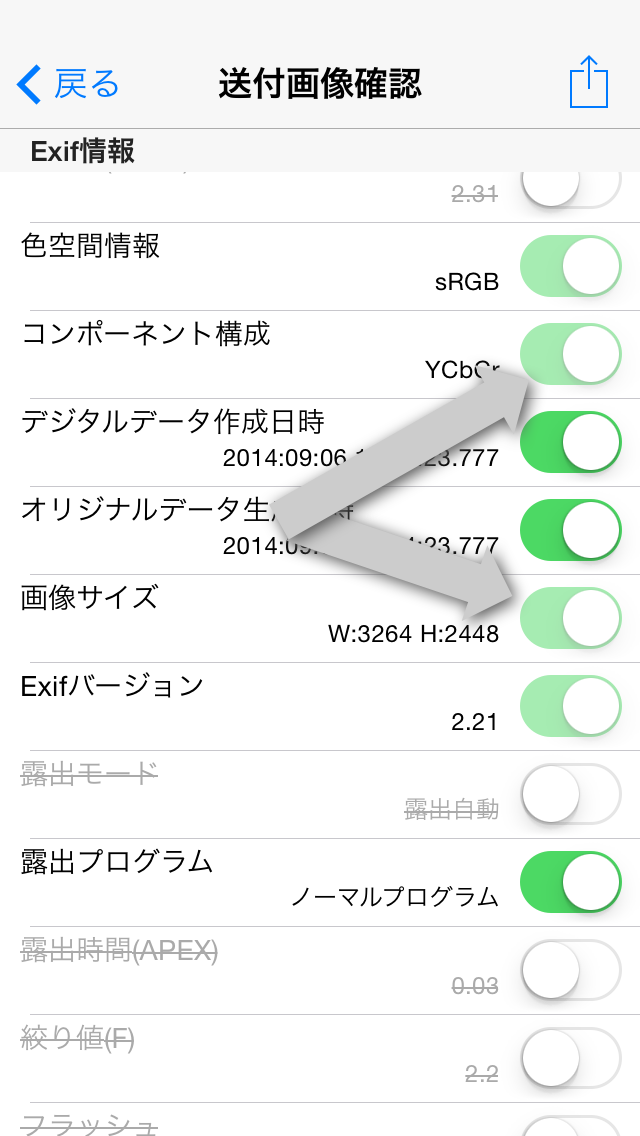
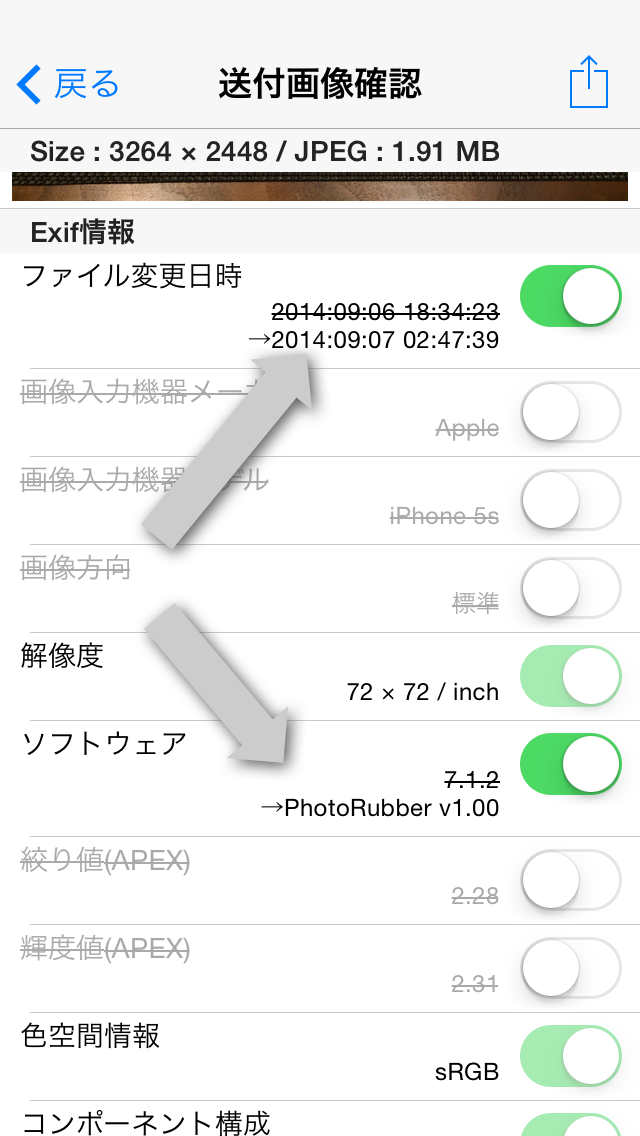
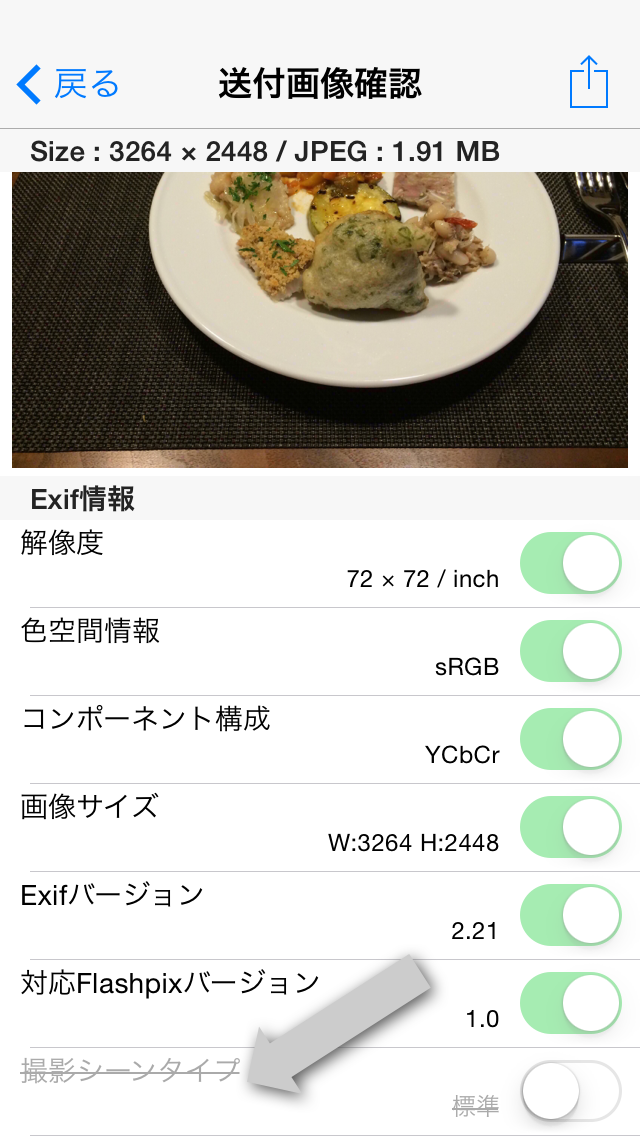
    As indicated by the arrow in the photo above、Some items in the photo information have their original values ​​crossed out.、Some have new values ​​set。These items are、When you turn on the switch and send、Update to new values ​​and submit the image(Of course, if the switch is OFF, the item will be deleted.。)。

    The following six types of information、This is an item that will be updated to a new value.。

    • File change date and time
      → Change the current file sending date and time。
    • Software
      → see Photo Rubber (The version number)”。
    • Image orientation
      →If the image direction is other than "Standard"、Change to "Standard"。
    • Image size
    • Subject area
    • Subject position
      →The above three items are、change the image direction、When changing the image size by cropping or resizing、change in conjunction。

    These information、Exif specification(For digital still camera image file format standard)in、This is an item that is recommended to be updated and recorded when the app saves an image.。Photo eraser、respect this standard、Updating and saving values。

    actually、Some image processing apps、The "Image direction" item is not recognized correctly.、Some images may be displayed in the wrong direction.。If you want to use an app like this but are having trouble displaying images correctly.、If you pass the photo eraser、Image orientation is updated to "Standard"、The image will now be displayed in the correct orientation。In addition、The "Image direction" item is a deletable item.、If this item does not exist, it is assumed that "Standard" is set.。therefore、There is no problem even if you erase the "Image direction" item with the Photo eraser.。Photo eraser、Delete "Image direction" item(Or update to the 'standard')instead of doing、Rotate and save the image image to its original correct orientation。In conjunction with this, the image size and coordinates of the subject area are also properly corrected.。

  • [Exif confirmation] Delete all photo information that can be deleted.、Even though I saved it to the photo library, the information "shooting scene type" does not seem to be deleted.、why??

    scene

    Delete all photo information that can be deleted.、After saving to photo library、When you reload with Photo Eraser and check the photo information、As shown by the arrow in the photo above, it appears that the information "shooting scene type" remains without being deleted.。

    this is、Photo eraser is not because you forgot to delete it、When saving deleted photos、This is because the photo library automatically adds and saves the "shooting scene type" information.。Instead of saving to your photo library、When sending to email or other apps、We have confirmed that the "shooting scene type" information has been deleted and received.。Please use with confidence。

    Depending on the image、There are images where essential information such as "Exif version" and "component configuration" does not originally exist.、The Photo eraser will remain in a state where there are no required items.、Once you check what you have saved in your photo library,、The item may have been added after all.。This too、This is because the photo library is automatically adding the item。like this、Depending on the app、There are some items that can be added without permission.。Even in that case、If you can send photos directly to Photo Eraser using the app's sending function、With Photo Eraser, you can clearly see the storage status of photo information.。Please take advantage of it。

  • [Exif confirmation] Some switches are displayed dimly in the photo information and cannot be turned off.。can't this be deleted?

    disable

    As indicated by the arrow in the photo above、Photo information(EXIF information)There are items in the list that have dimmed switches.。This item cannot be deleted、Can't turn it off。

    The following six types of information cannot be deleted.。

    • RES
    • Color space information
    • Component configuration
    • Image size
    • EXIF version
    • Flashpix version

    • Resolution
    • A color space information
    • Meaning of each component
    • EXIF version
    • Supported Flashpix version


    These information、Exif specification(For digital camera image file format standard)Because it is specified as "required" in、Photo eraser will try to keep it instead of deleting it。

    In addition、Some images may be inherently missing some of these essential information。Photo eraser if required information does not exist、No particular information added、remain non-existent。but、After saving to photo library、If you open the photo again, the required information may have been added.。this is、Not given by Photo Eraser、This is because the photo library automatically fills in the required information.。For more detailsClick herePlease take a look at。

  • [Blur function] When blurring a large image、Why does it sometimes suddenly turn black??

    Screenshot 2014.09.07 03.19.02

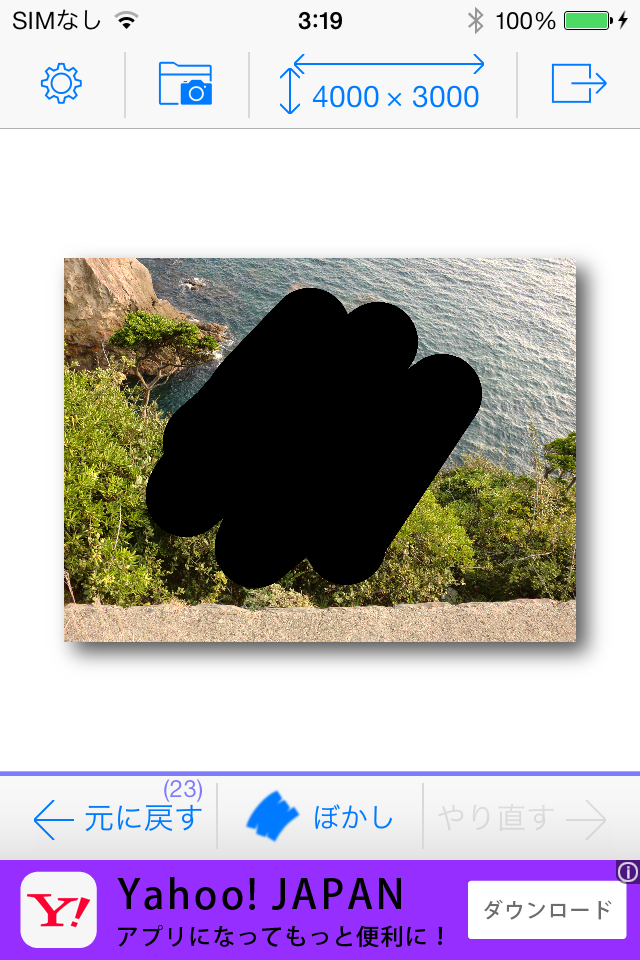
    like the picture above、4000×3000When trying to blur an image with large pixels、The traces traced with your finger do not become blurred、We have confirmed the phenomenon of being painted black.。
    It is assumed that the blurring processing library is malfunctioning due to image processing overload.、We are currently unable to determine the exact cause.、No effective measures have been taken on the app side.。
    actual、In large images where this phenomenon occurs,、The response of the blurring process itself is very poor.、This will be edited in a very stressful situation.。
    We apologize for the inconvenience, but、If such a phenomenon occurs,、Please resize and edit it to the size appropriate for the destination in advance.。
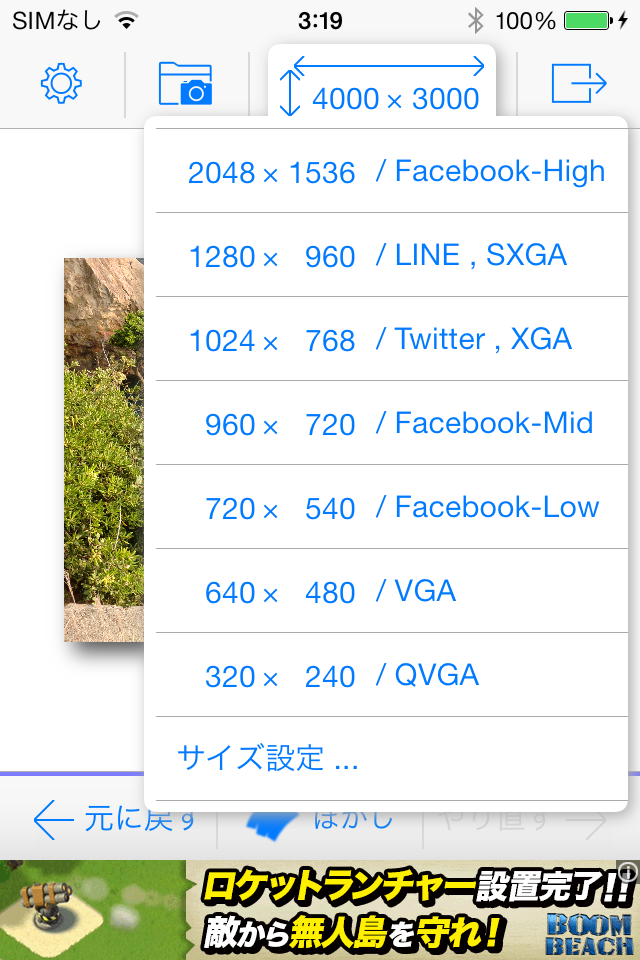
    Tap the size display area at the top of the menu、A menu like the one below will appear.、If you choose a smaller size、You can edit smoothly from now on.。Redo the resizing process(Undo)Because you can、How small will the image quality and operability be?、You can try various things。


    Screenshot 2014.09.07 03.19.24

    In addition、If this black-painting phenomenon occurs,、You need to restart the app once。To restart the app、Double-click the home button to launch the multitasking screen、Delete Photo Eraser(App screens on flick)After that、Tap the Photo eraser icon from the home screen。

    Now、This phenomenon has been confirmed by、iPad2,iPhone4s,It's iPhone5。It is thought that a similar phenomenon will probably occur with the iPhone 5c and models released before the iPhone 5.。iPhone5s,iPad Air、Because of its high processing capacity、4000×3000This phenomenon is not observed even in pixels.。Also、3264 which is the camera shooting size of iPhone5s×2448within pixels、This phenomenon has not been observed on any model.。Please be careful when transferring large pixel-sized images taken with a digital camera to your iPhone for editing.。