
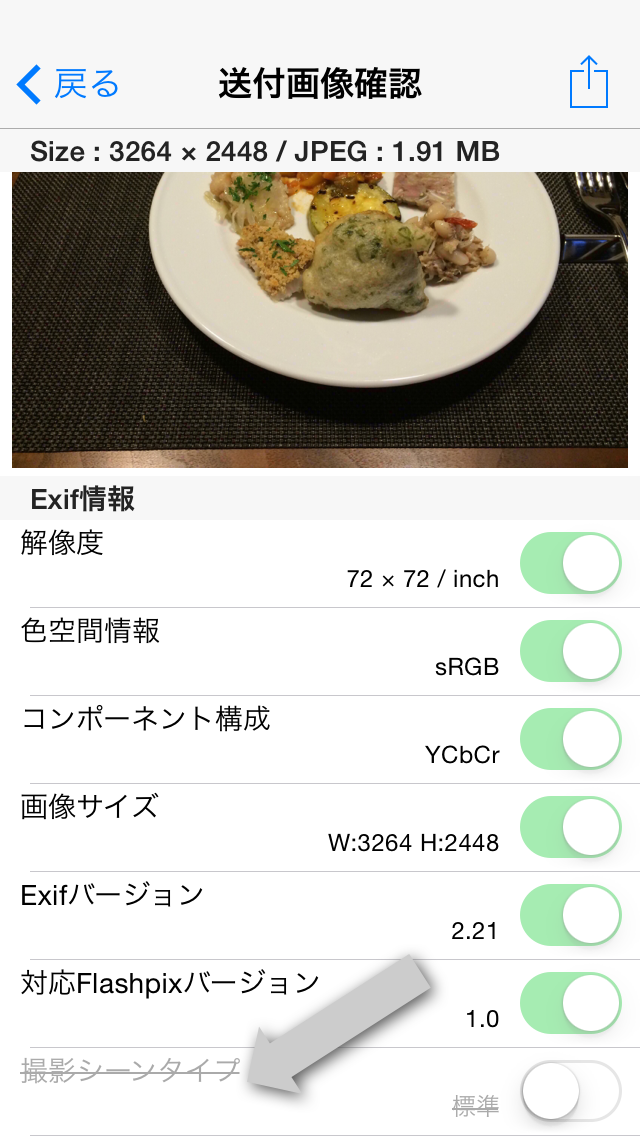
Delete all photo information that can be deleted.、After saving to photo library、When you reload with Photo Eraser and check the photo information、As shown by the arrow in the photo above, it appears that the information "shooting scene type" remains without being deleted.。
this is、Photo eraser is not because you forgot to delete it、When saving deleted photos、This is because the photo library automatically adds and saves the "shooting scene type" information.。Instead of saving to your photo library、When sending to email or other apps、We have confirmed that the "shooting scene type" information has been deleted and received.。Please use with confidence。
Depending on the image、There are images where essential information such as "Exif version" and "component configuration" does not originally exist.、The Photo eraser will remain in a state where there are no required items.、Once you check what you have saved in your photo library,、The item may have been added after all.。This too、This is because the photo library is automatically adding the item。like this、Depending on the app、There are some items that can be added without permission.。Even in that case、If you can send photos directly to Photo Eraser using the app's sending function、With Photo Eraser, you can clearly see the storage status of photo information.。Please take advantage of it。
Leave a Reply