Category: Additional information

  • Walking Player articles

    Walking Playerの玹介蚘事をここでたずめたす。
    掲茉しおいただいたメディアの皆様、ありがずうございたす。
    新しく玹介しおいただいた蚘事は、今埌このペヌゞに远加しおいく予定です。

    【iPhone apps and iPad app discovery platform 'Appliv'] Mr
    201411-26. Walking Player
    【iPhonePLUS Powered by weekly ASCII] Mr
    2014One day in January. For the new year you too eat. Dieting can be fun! Walking Player
    【TERA APPs – Death night&Bamboozle AX killing time apps review site] Mr
    2013On December 12,. Your favorite music to adapt to walking pace! Walking Player
  • 160. ranked walking Player!

    Thanks Walking Player recorded 160 AppStore music category of the top free ranking!

    これも、みなさんがダりンロヌドしおくださったり、呚りの方に玹介しおいただいたおかげです。本圓にありがずうございたす。

    (Changes in walking Player Rankings)
    http://appgraphy.me/graph/?appid=665645142

  • How to use Nike running and Player Walking together

    See how to use Nike Running and Player Walking together?」っおいう質問を䜕人かの方から頂いたので、その方法を解説したいず思いたす。
    いや、そんな難しい話じゃないです。でも質問を頂くず蚀うこずは、やはりそういうこずをしたいずいう人が倚いのだず思いたす。簡単ですよっおこずを今から説明したいず思いたす。

    [And Nike running apps]
    And Nike running apps、Nikeからリリヌスされおいるランニングサポヌトアプリで、無料でダりンロヌドできたす。ランニング䞭にポケットに入れおおくだけで、走行距離や走行ペヌスを蚘録しお報告しおくれたす。ずいうか、私が説明するより、以䞋のペヌゞを芋おもらった方がわかりやすいですね。
    http://nikeplus.nike.com/plus/products/gps_app/

    ちなみに、iPhoneには「Nike+iPod」ずいうアプリが最初から入っおいお、よく䌌おいたすが「Nike+Running」ずは別物です。「Nike+iPod」は、「Nike+iPod Sensor」ずいうセンサヌを賌入しないず䜿えたせん。(Description of the Nike iPod click herehttp://www.apple.com/jp/ipod/nike/)
    でも「Nike+iPod」もセンサヌさえあればWalking Playerず䞀緒に䜿えるはずです。
    「Nike+Running」の方は、アプリを無料でダりンロヌドするだけで䜿えたす。

    それでは、Nike+RunningずWalking Playerを䞀緒に䜿う方法を説明したす。

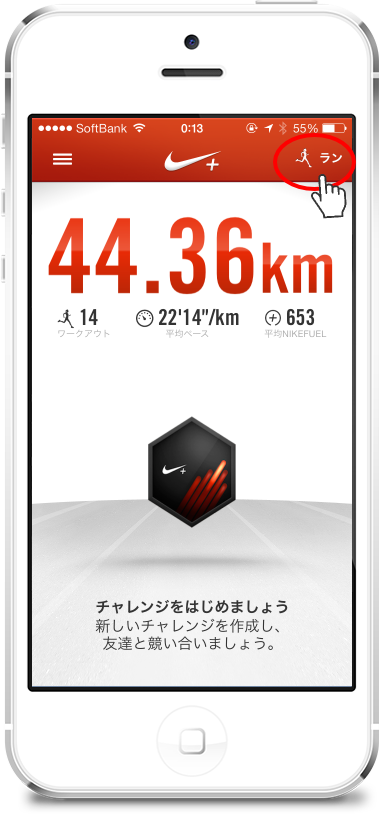
    1.first、Nike+Runningアプリを起動したす。

    ここで画面右䞊の「ラン」のボタンをタップするず、次のような画面になりたす。

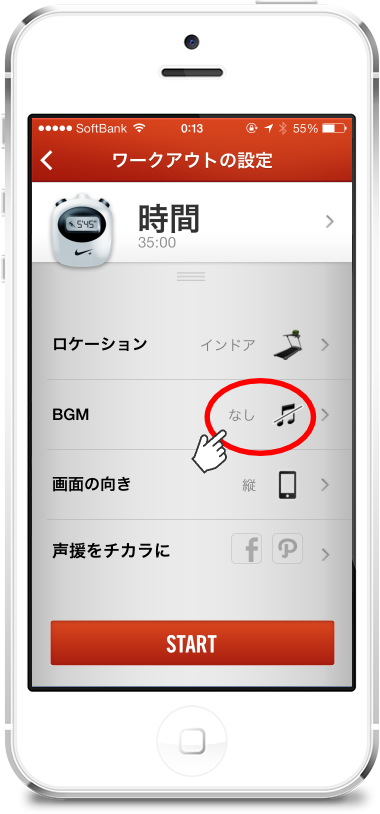
    2.ここが重芁です。ずいうか、ここ以倖に泚意点はありたせん!
    この画面で、BGMを「なし」に蚭定したす。

    そしお「START」ボタンをタップするず、ワヌクアりトが開始されたす。

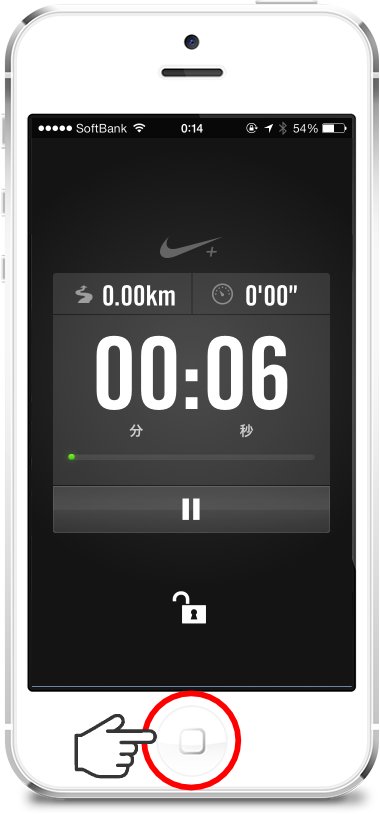
    3.ワヌクアりト䞭の画面です。
    ここで、ホヌムボタンをタップしおホヌム画面に戻りたす。

    ホヌム画面に戻っおも、バックグラりンドでワヌクアりトは継続され、走行距離はちゃんずカりントされたす。

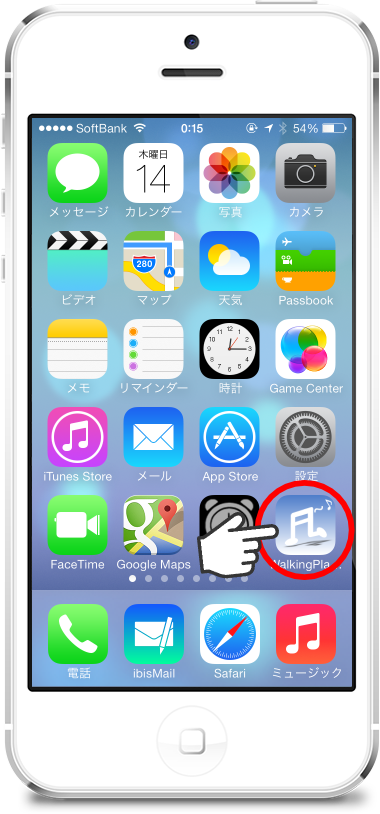
    4.ホヌム画面からWalking Playerを起動したす。

    5.Walking Playerで、お奜きな曲をお奜みのテンポで再生しおください。

    これで、Walking Playerで曲を再生しながら、Nike+Runningがバックグラりンドで走行距離を枬定しおくれたす。Also、定期的にNike+Runningが「xx分経過、走行距離xxキロ」ずいった報告を音声で入れおくれたすが、その時はWalking Playerの音量が少し絞られ、報告がちゃんず聞けるようになっおたす。報告が終わったらたた元の音量で再生を続けたす。

    Walking Playerの機胜制限を解陀しお、バックグラりンド再生を「オン」にしおいれば、Nike+RunningずWalking Playerの䞡方ずもバックグラりンドで動䜜したす。ずいうか、ランニング䞭にiPhoneをポケットに入れおいる状態は、画面が反応しないよう䞡方バックグラりンドで動䜜させた方がよいず思いたす。In addition、この堎合、先にWalking Playerで再生を開始しお、埌からNike+Runningのワヌクアりトを開始しおも倧䞈倫です。

    それでは、今日も゚クササむズ頑匵っおください

  • back features by the swipe of a iOS7

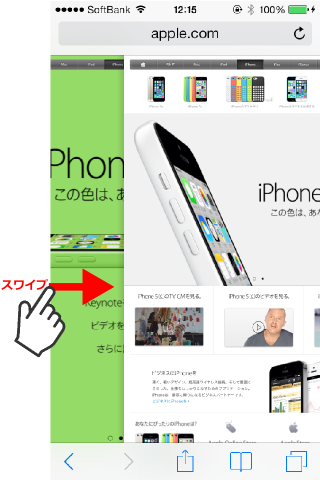
    iOS7 Safari、By swiping right from the left edge of the screen、The browser's "back" function is executed。
    (Safari screen)

    *The trick is to start swiping from the left edge of the screen as far as possible.。

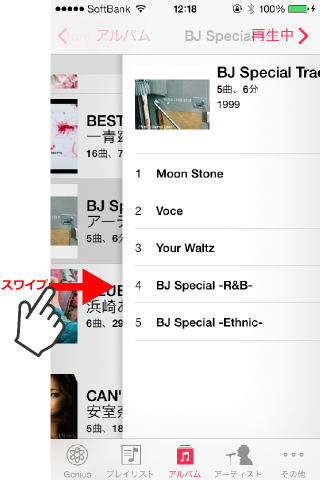
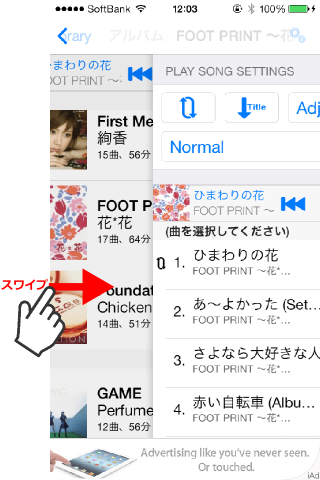
    This thing is、It is often introduced on various sites.、Actually, this feature is not only available in Safari.、With standard apps such as the “Music” app or the “Memo” app.、It is also effective in situations where details are selected and displayed from a list.。
    (If you screen)

    Actually, this function、This is a standard feature implemented in the UINavigationController class of the iOS7 SDK.。that's why、An app built using the iOS7 SDK、Apps using UINavigationController、(Unless you don't change the touch action)This feature is automatically provided。
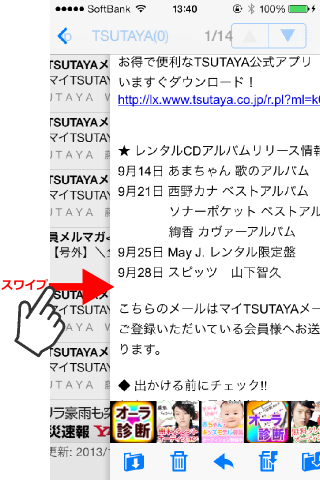
    for example、My favorite email app, ibisMail, is also available.、Now supports iOS7 flat GUI image、This app also has the swipe-to-back function enabled.。
    (ibisMail screen)

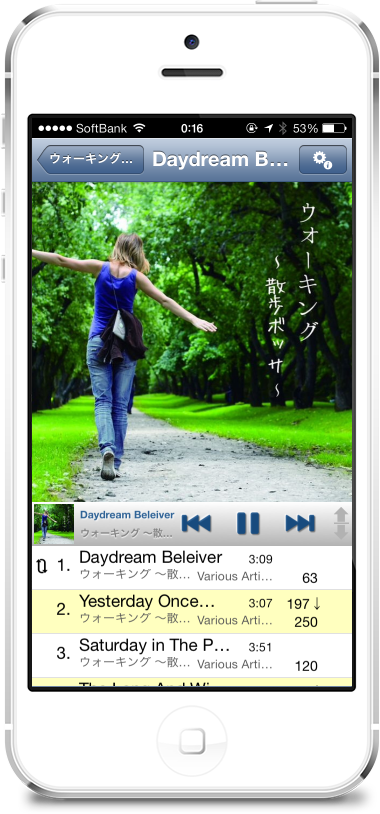
    Walking Player is also currently developing a version that supports flat GUI images for iOS7.、Similarly, the swipe-to-back function is expected to be enabled.。
    (Developing Walking Player screen)

    Now、The revised release of Walking Player has been delayed a little.、In addition to simply supporting flat GUI images for iOS7、We have also implemented several user interface improvements common to iOS7/iOS6.。I think it's worth updating even for those who are still using iOS6.。Please wait for a while until release。

  • bug iOS7 you work for

    Now、Walking PlayerのiOS7フラットGUI察応版を開発䞭ですが、そんな䞭で暙準のミュヌゞックアプリの䞍具合を芋぀けたしたので、たずめおおきたす。
    特別な条件での問題ですが、奇劙な動䜜でお困りの方がいたら、本蚘事が参考になれば幞いです。

    [Problem description]
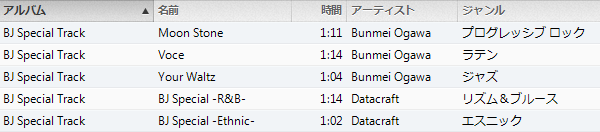
    私のミュヌゞックラむブラリには、以䞋の「BJ Special Track」ずいうアルバムが入っおいたす。

    このアルバムが他ずちょっず倉わっおいるのは、アルバム内に耇数のゞャンルが混圚しお入っおいるずいう点です。通垞、1぀のアルバム内の曲は党お同じゞャンルの曲です。問題が発生するのは、このように1぀のアルバム内に耇数のゞャンルがある堎合です。
    (このアルバムは、確か昔、䜕かのパ゜コンかアプリの䞭に無料でサンプルずしお入っおいたもので、もしかするず結構倚くの人が無意識に持っおいるかもしれたせん)

    Problem generating operation
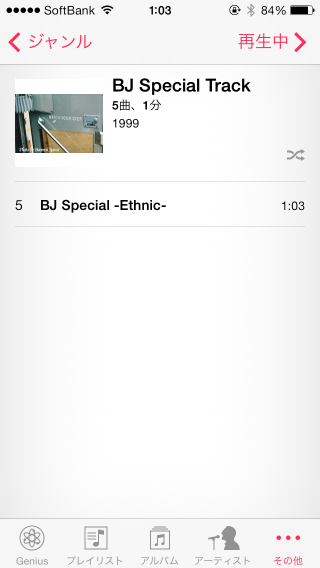
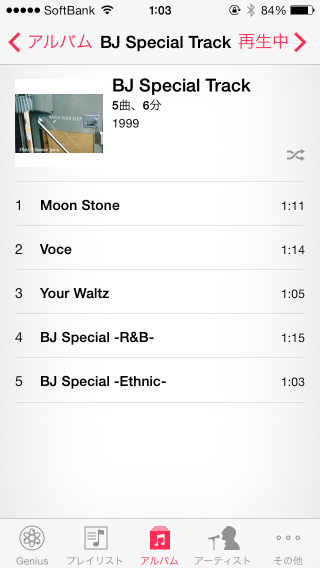
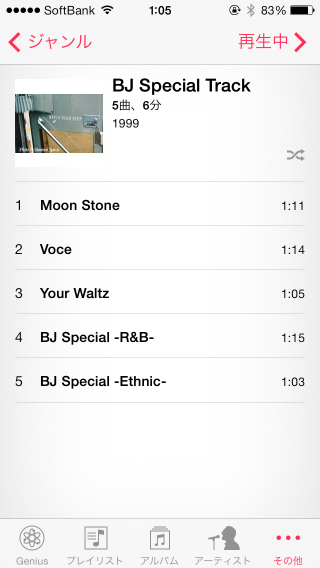
    ミュヌゞックアプリを䞀旊停止/再起動埌、[Genre]-[Ethnic]ず遞ぶず、以䞋の画面のように[BJ Special Track]Ethnic genres in the album said that during[BJ Special-Ethnic-]ずいう曲だけが絞り蟌んで衚瀺されたす。これは正しい衚瀺です。(「5曲、1分」ず衚瀺されおいお、再生時間は1曲分なのに曲数はアルバム党䜓の5曲になっおいるのはおかしいず思いたすが、これはたいした問題ではなく今回の問題ずは別の話なので目を぀ぶるこずにしたす。)

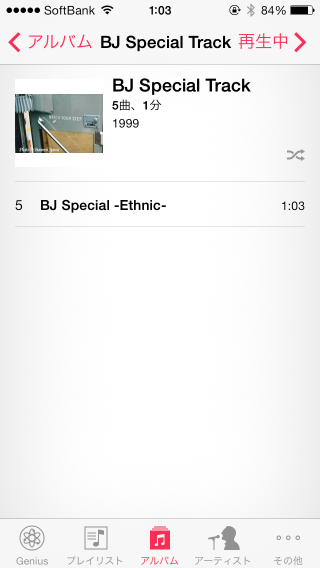
    続いお、[Album]-[BJ Special Track]を遞ぶず、以䞋の画面のように[BJ Special-Ethnic-]ずいう曲だけ衚瀺され、他の曲が衚瀺されたせん。

    この画面はゞャンルで絞っおないのだから、このアルバムに入っおいる5曲を党郚衚瀺しないず、これではアルバム内の党おの曲が聞けなくなっおしたいたす。

    次に、もう䞀床ミュヌゞックアプリを停止/再起動埌、[Album]-[BJ Special Track]を遞ぶず、今床は以䞋の画面のように5曲党おが衚瀺されたす。これが正しい衚瀺です。

    but、続いお[Genre]-[Ethnic]を遞ぶず、以䞋の画面のようにゞャンルで絞られないで5曲党郚衚瀺されおしたいたす。

    実はこれはiOS7䞊のWalking Player v1.02でも同じ問題が発生したす。(iOS6.1では、暙準のミュヌゞックアプリもWalking Playerもこの問題は発生したせん。)

    [Workaround]
    ずりあえずアプリを再起動したら、どちらか先にアクセスした方は正しく衚瀺されたす。

    [Future response plans]
    䞊蚘の珟象をWalking Playerの動䜜確認で調査したずころ、iOS7のミュヌゞックラむブラリアクセスAPIに問題があるこずたで刀っおいるので、別途Appleにバグレポヌトしおおく予定です。ただ、特別な条件での問題なので、すぐには盎しおくれないかもしれたせん。

  • Tempo rate survey results

    How accurately can Walking Player and similar apps' automatic tempo analysis feature measure tempo?、I checked the accuracy rate。

    (Songs used in the survey)

    Kana Nishino's album、96 songs from singles were measured.。

    (Survey app)

    'WP':Walking Player v1.01
    AS:AudioStep v1.01
    'TM':Tempo Magic Pro v3.0
    'BB':BODiBEAT GPS run&Walk v1.1.5

    (For the survey results)

    • AudioStep、The BPM value is displayed to the third decimal place.、Rounded off and expressed as an integer value。
    • Items with “x” in the measurement result column、The app says "unmeasurable"。

    (Correct method)

    Compare the automatic measurement results of each app with the manual measurement results.、If the difference from the manual measurement result was within ±1, it was considered correct.。Also、If the difference in the result of multiple adjustment was within ±1, it was also considered correct.。
    (Example)Automatic measurement results:50、Manual measurement results:101in the case of、50Comparing ×2=100 with the manual measurement results, it was determined to be the correct answer.。

    (Rate Roundup)

    App name Correct answer rate
    Walking Player v1.01 94%
    AudioStep v1.01 41%
    Tempo Magic Pro v3.0 56%
    BODiBEAT GPS run&Walk v1.1.5 81%

    (Study on)

    • All three apps other than Walking Player have a certain number of results that are "unmeasurable".、Walking Player、On the analysis algorithm、Never become unmeasurable。What is Walking Player and the other 3 apps?、I suspect that the way tempo is measured is fundamentally different.。
    • BODiBEAT is、Except for the unmeasurable、There are 3 cases with an error of ±2 that gave incorrect values.、There are only two errors larger than that, so、Excellent for the results。however、There are 12 cases that cannot be measured.、I lowered my accuracy rate by that amount.。
    • AudioStep、Tempo Magic Pro is、The accuracy rate is lower than expected。Half needs to be measured manually。
    • Kana Nishino's album、There is a 1 minute prologue/epilogue song at the beginning and end of the album.、There is also a narration-like story within it.、Those songs seem difficult to analyze。Of the 6 things Walking Player got wrong、4This is the prologue song/epilogue song.。vice versa、I think it can be said that it is excellent that there are only 2 errors in a normal song.。

    (Result details)


    Title Album title Artist Measurement results(BPM value) Accuracy determination
    WP AS TM BB Manual WP AS TM BB
    *Prologue * ~ Kirari ~ LOVE one. Kana Nishino 199 100 x 99 100 ○ ○ × ○
    Even farther LOVE one. Nishino Kana Feat. WISE 60 160 120 120 120 ○ × ○ ○
    doll LOVE one. Kana Nishino 127 127 126 127 127 ○ ○ ○ ○
    Girlfriend LOVE one. Kana Nishino 54 108 x x 108 ○ ○ × ×
    To your voice LOVE one. Nishino Kana Feat. VERBAL 187 x 94 94 94 ○ × ○ ○
    Style. LOVE one. Kana Nishino 113 113 113 x 113 ○ ○ ○ ×
    Life goes on… LOVE one. Kana Nishino 54 x 109 107 108 ○ × ○ ○
    I LOVE one. Kana Nishino 126 126 128 125 126 ○ ○ × ○
    Candy LOVE one. Kana Nishino 65 174 98 129 130 ○ × × ○
    MAKE UP LOVE one. Kana Nishino 118 119 116 118 118 ○ ○ × ○
    glowly days LOVE one. Kana Nishino 135 135 134 135 135 ○ ○ ○ ○
    Celtic LOVE one. Kana Nishino 101 101 x 152 151 × × × ○
    You want to see from LOVE one. Kana Nishino 88 x 87 88 88 ○ × ○ ○
    *Epilogue * ~ LOVE one...- LOVE one. Kana Nishino 200 x 131 x 100 ○ × × ×
    More... More... Kana Nishino 180 121 178 180 90 ○ × × ○
    missing you More... Kana Nishino 196 98 78 97 98 ○ ○ × ○
    Dear My Friends More... Kana Nishino 129 129 130 128 129 ○ ○ ○ ○
    Dear… Dear… / MAYBE Kana Nishino 85 x 85 85 85 ○ × ○ ○
    MAYBE Dear… / MAYBE Kana Nishino 128 x 128 128 128 ○ × ○ ○
    Yours only, ~ Maison de
    m-flo-
    Dear… / MAYBE Nishino Kana Feat. WISE 70 112 140 139 140 ○ × ○ ○
    Best Friend Best Friend Kana Nishino 117 157 117 116 117 ○ × ○ ○
    ONE WAY LOVE Best Friend Kana Nishino 101 101 100 101 101 ○ ○ ○ ○
    Tonight's PARTY UP Best Friend Kana Nishino 125 125 125 249 125 ○ ○ ○ ○
    Aitakute, aitakute I want to see society wasAnd Kana Nishino 110 x x 110 110 ○ × × ○
    LOVE IS BLIND I want to see society wasAnd Kana Nishino 128 128 129 x 128 ○ ○ ○ ×
    Grab Bag I want to see society wasAnd Kana Nishino 60 123 119 119 120 ○ × ○ ○
    *Prologue * ~ What a nice ~ to LOVE Kana Nishino 196 x 102 x 120 × × × ×
    Best Friend to LOVE Kana Nishino 117 157 155 116 117 ○ × × ○
    Summer Girl to LOVE Nishino Kana Feat. MINMI 62 124 123 124 124 ○ ○ ○ ○
    Hey Boy to LOVE Kana Nishino 72 96 143 72 143 ○ × ○ ○
    More... to LOVE Kana Nishino 180 121 177 180 90 ○ × × ○
    love & smile to LOVE Kana Nishino 90 90 90 x 90 ○ ○ ○ ×
    Up until this to LOVE Kana Nishino 150 149 149 74 150 ○ ○ ○ ×
    MAYBE to LOVE Kana Nishino 128 x 127 128 128 ○ × ○ ○
    WRONG to LOVE Kana Nishino 123 123 122 122 123 ○ ○ ○ ○
    Come On Yes Yes Oh Yeah!! to LOVE Kana Nishino 125 125 109 125 125 ○ ○ × ○
    Dear… to LOVE Kana Nishino 85 x 84 85 85 ○ × ○ ○
    Aitakute, aitakute to LOVE Kana Nishino 110 x x 110 110 ○ × × ○
    You are the one to LOVE Kana Nishino 184 123 150 91 92 ○ × × ○
    *Epilogue * ~ to LOVE ~ to LOVE Kana Nishino 196 x 118 x 119 × × ○ ×
    If If Kana Nishino 123 163 123 122 123 ○ × ○ ○
    I & # 8217s; ll be there If Kana Nishino 75 x 143 150 150 ○ × × ○
    Beautiful If Kana Nishino 143 143 143 71 143 ○ ○ ○ ○
    You're You're Kana Nishino 72 x 97 72 72 ○ × × ○
    Christmas Love You're Kana Nishino 122 162 121 121 122 ○ × ○ ○
    GIRLS GIRLS You're Kana Nishino 87 114 84 86 87 ○ × × ○
    Distance Distance Kana Nishino 140 94 139 70 140 ○ × ○ ○
    beloved Distance Kana Nishino 87 x 82 86 87 ○ × × ○
    Call Me Up Distance Kana Nishino 50 133 80 x 100 ○ × × ×
    Esperanza Esperanza Kana Nishino 56 112 111 x 112 ○ ○ ○ ×
    Thinking of you Esperanza Kana Nishino 178 120 113 89 89 ○ × × ○
    ONLY ONE Esperanza Kana Nishino 128 129 114 128 128 ○ ○ × ○
    *Prologue * Sunrise Thank you, Love Kana Nishino 108 x x 108 108 ○ × × ○
    Esperanza Thank you, Love Kana Nishino 56 112 112 112 112 ○ ○ ○ ○
    Clap Clap!! Thank you, Love Kana Nishino 163 109 81 81 82 ○ × ○ ○
    Together Thank you, Love Kana Nishino 90 180 90 89 90 ○ ○ ○ ○
    Distance Thank you, Love Kana Nishino 140 x 139 69 140 ○ × ○ ×
    I & # 8217s; ll be there Thank you, Love Kana Nishino 75 x 106 150 75 ○ × × ○
    Flower Thank you, Love Kana Nishino 150 150 75 x 150 ○ ○ ○ ×
    Every Boy Every Girl Thank you, Love Kana Nishino 128 128 116 x 128 ○ ○ × ×
    Where are you? Thank you, Love Kana Nishino 123 123 122 122 123 ○ ○ ○ ○
    If Thank you, Love Kana Nishino 123 164 123 122 123 ○ × ○ ○
    Alright Thank you, Love Kana Nishino 120 120 120 120 120 ○ ○ ○ ○
    You're Thank you, Love Kana Nishino 72 x 96 72 72 ○ × × ○
    Wishing Thank you, Love Kana Nishino 73 x 147 73 73 ○ × ○ ○
    *Epilogue * Thank you,
    Lovely
    Thank you, Love Kana Nishino 108 108 90 81 108 ○ ○ × ×
    たずえ どんなに... たずえ どんなに... Kana Nishino 180 90 90 179 90 ○ ○ ○ ○
    Just the way you are たずえ どんなに... Kana Nishino 184 92 91 92 92 ○ ○ ○ ○
    Secret たずえ どんなに... Kana Nishino 133 x 143 130 131 × × × ○
    SAKURA, I love you? SAKURA, I love yoyou? Kana Nishino 176 118 100 176 176 ○ × × ○
    My Baby SAKURA, I love yoyou? Kana Nishino 65 x 130 130 130 ○ × ○ ○
    sweet sweet SAKURA, I love yoyou? Kana Nishino 170 113 111 166 170 ○ × × ×
    私たち 私たち Kana Nishino 180 177 90 90 90 ○ × ○ ○
    Happy Half Year! 私たち Kana Nishino 97 129 123 97 97 ○ × × ○
    LOVE LIKE CRAZY 私たち Kana Nishino 132 132 131 66 132 ○ ○ ○ ○
    GO FOR IT!! GO FOR IT!! Kana Nishino 147 118 147 73 147 ○ × ○ ○
    TALK TO ME GO FOR IT!! Kana Nishino 180 x 90 179 180 ○ × ○ ○
    SUMMER TIME GO FOR IT!! Kana Nishino 128 128 133 127 128 ○ ○ × ○
    *Prologue * Welcome Love Place Kana Nishino 185 x x x 91 × × × ×
    私たち Love Place Kana Nishino 180 173 x 90 90 ○ × × ○
    Day 7 Love Place Kana Nishino 159 107 106 159 159 ○ × × ○
    GO FOR IT!! Love Place Kana Nishino 147 117 147 73 147 ○ × ○ ○
    Be Strong Love Place Kana Nishino 199 100 100 x 100 ○ ○ ○ ×
    Happy Half Year! Love Place Kana Nishino 97 129 124 97 97 ○ × × ○
    Love Song Love Place Kana Nishino 168 168 83 83 168 ○ ○ × ×
    FANTASY Love Place Kana Nishino 90 90 89 90 90 ○ ○ ○ ○
    Is this love? Love Place Kana Nishino 131 131 130 131 131 ○ ○ ○ ○
    Honey Love Place Kana Nishino 137 140 136 136 136 ○ × ○ ○
    SAKURA, I love you? Love Place Kana Nishino 176 118 94 87 88 ○ × × ○
    たずえ どんなに... Love Place Kana Nishino 180 90 119 179 90 ○ ○ × ○
    kiss & hug Love Place Kana Nishino 86 172 85 85 86 ○ ○ ○ ○
    My Place Love Place Kana Nishino 164 109 109 165 164 ○ × × ○
    *Epilogue * Love Place Love Place Kana Nishino 185 x 96 96 97 × × ○ ○
    Always Always Kana Nishino 160 161 80 80 80 ○ ○ ○ ○
    Happy Song Always Kana Nishino 135 135 135 135 135 ○ ○ ○ ○
    Love you, Miss you Always Kana Nishino 130 x 128 130 130 ○ × × ○
    正解数 90 39 54 78
    䞍正解数 6 57 42 18
    Correct answer rate 93.75% 40.63% 56.25% 81.25%
    䞍正解率 6.25% 59.38% 43.75% 18.75%
  • For a comparison of walking Player and similar apps

    Walking Playerず他の類䌌アプリに぀いお、いろいろ比范しおみたいず思いたす。
    (もちろん、これはWalking Player䜜者目線であるこずをご了承ください。)

    実は、このアプリを䜜り始めたころは、あんたり深くラむバル調査しおいたせんでした。ずいうか、無償提䟛で広告収入任せ(If you use in the background without seeing ads in-app billing)の予定だったので、少なくずも無償でテンポを自動解析するアプリは他にいないこずを確認しお開発を始めたした。

    でも、開発終盀(ずいうか、ほずんどリリヌス前)になっお、やっぱり有償アプリで類䌌コンセプトを持っおいるものが、どれくらいすごいのか気になっおきお、いく぀か賌入しお調べおみたした。

    in、近いコンセプトを持぀以䞋の3぀の有償アプリず比范しおみたいず思いたす。

    [Each app concept and overview]

    • AudioStep
      このアプリは、Walking Playerを開発しおいる最䞭(2013About June)にAppStoreの新着情報で芋぀けたした。぀い最近リリヌスされたアプリです。このアプリのコンセプトはちょっず倉わっおいお、ランニングする時のテンポは180BPMで走るず怪我のリスクが枛るよ。だから、このアプリで党郚の曲を180BPMに倉曎しお再生しちゃうよ!っおこずだそうです。たぁ実際には180BPMだけじゃなくお、120200BPMたで調敎できるのでりォヌキングにも䜿えたす。でも、ちょっずゆっくりめに100120BPMくらいでりォヌキングしたい堎合、察応できたせん。(95BPMなら倍数換算しお95×2=190BPMで合うんですけど、100120BPMに合わせられる倍数倀がありたせん)
    • Tempo Magic Pro
      This app is high price(ï¿¥ 450)ので、開発着手段階では調査察象倖にしおたした。が、コンセプトはWalking Playerにずおも近いです。これを100円以䞋の䜎䟡栌でリリヌスされおいたら、Walking Playerは開発はしなかったかもしれたせん。テンポ調敎範囲は(In HiFi Mode)元のスピヌドの-50%+50%たで可胜ですので、倍数換算すればどんなテンポにも合わせられたす。でも、ちょっず自動調敎の仕方が甘いず思うんですけど、䟋えばオリゞナル128BPMの曲を170BPM(+33%)で再生しおお、次の曲に替わっおオリゞナルテンポが98BPMになった時、+50%の146BPMに再生テンポが萜ちちゃうんですよね。こういう時は、98BPMの-14%で85BPMにしちゃえば、倍数換算で85×2=170BPM盞圓のテンポを続けられるのに。もし䜎䟡栌でリリヌスされおおもこういう点だずか、埌で説明する再生曲遞択機胜だずかに䞍満を感じお、結局Walking Playerを開発しちゃったかな。
    • BODiBEAT GPS run&Walk
      倩䞋のYAMAHAさんがリリヌスしおいるアプリです。無償版の「BODiBEAT Free for iPhone」っおのもあるんですが、そちらは自分が持っおる楜曲を再生するのではなく、アプリが自動䜜曲したリズムを流すだけなので察象倖です。「BODiBEAT GPS ラン&りォヌク」の方は、iPhoneに入っおいる曲を再生できたす。そのコンセプトを説明した動画がhttp://www.youtube.com/watch?v=E44InxmFc8Aにあるんですが、たさにWalking Playerのコンセプトそのものです。さすがYAMAHAさん、わかりやすいPVを䜜りたす。あの動画の「BODiBEAT」を「Walking Player」ず曞き倉えたいくらいです(Lol)。が、YAMAHAさんのやり方は、元の楜曲のテンポを倉曎するのではなく、今の運動テンポに合った楜曲をオリゞナルテンポのたた再生しようずいう考えです。぀たり、Walking PlayerのAdjust Playモヌドは無しで、Skip Playモヌドのみっおこずです。いや、Skip Playず同じだずいうのは少し語匊がありたしお、このアプリがすごいのは、iPhoneの加速床センサヌを䜿っお、自分が今歩いおいるテンポを枬定し、そのテンポにあった曲を再生するずいうこずです。実はYAMAHAさんは、このアプリを出す前に2009幎頃から「BODiBEAT(http://jp.yamaha.com/support/fitness/bodibeat)」ずいうランニング/りォヌキング甚ミュヌゞックプレむダヌを販売しおお、圓時¥29000くらいしたかず思うんですけど、私は実際にその補品を買っお䜿っおたした。保蚌曞に手曞きでシリアル番号が曞かれおお、結構初期ナヌザだったず思いたす。in、その機胜をそのたたiPhone䞊に䜜りこたれたのが「BODiBEAT GPS ラン&りォヌク」なのですが、昔から結構䞍満があったんですよね。䜕が䞍満だったかずいうず、「今自分が聞きたい曲が再生されない!」っおこずです。自分が遞ぶんじゃなくおアプリが適圓なのを遞んじゃいたすので。それず、疲れおきおちょっずペヌスが萜ちたら、曲の途䞭で勝手に別の曲に替えられるっおこずも䞍満でした。奜きな曲を聞きながらぎりぎり頑匵っおいたのを勝手に替えられお、ペヌスを戻しおももう別の曲しか遞ばれないっお感じです。それで、かなり䞍満を持っお「BODiBEAT」を䜿うのはやめおしたいたした。After that、自分で手動テンポ解析しおりォヌキングにあった曲を手動でプレむリストにしおiPodで再生するずいうのを数幎やっおたした。そしお、今幎になっおiPhoneでアプリを開発できる環境がそろったので、今たでの䞍満を解消するWalking Playerを自分で䜜ったのです。そう、実はWalking Playerの開発原点はBODiBEATの䞍満から来おいたす。Walking PlayerのSkip Playモヌドは、自分が今歩いおいるテンポを枬定したせんが、それでいいんです。「今日も歩くぞヌっ!Playing the guy today suit the tempo from song of this artist just pick meee!I continued playing keep up their pace pace back from 替enaide is the tempo of the song.!」っお蚀えるのが、Walking PlayerのSkip Playモヌドです。
      でも、「BODiBEAT GPS ラン&りォヌク」がすごいのは音楜再生だけじゃなくお、GPSで走行経路を蚘録したり、FacebookやTwitterに投皿したり、別の人ずテンポを合わせたりずいった、倚圩な機胜があるこずでしょうね。Walking Player、そういうのは䞀切やめるこずにしおたしお、そういうのが必芁ならNike+Runningずか別のランニングサポヌトアプリず䞀緒に䜿えばいいんじゃない?っお考えです。

    以䞋、項目別に比范しおみたす。

    1.[Price]

    • AudioStep
      △
      ï¿¥ 170
    • Tempo Magic Pro
      ×
      ï¿¥ 450
    • BODiBEAT GPS run&Walk
      △
      ï¿¥ 170
      BODiBEAT GPS run&りォヌクは、9/1たでキャンペヌン䟡栌¥85です。
    • Walking Player
      ○
      ¥ 0
      アプリ内課金¥85で、広告削陀ずバックグラりンド再生継続ができたす。

    2.[Supported operating systems]

    • AudioStep
      △
      requires iOS6.1 or higher
    • Tempo Magic Pro
      ○
      requires iOS5.0 or higher
    • BODiBEAT GPS run&Walk
      ○
      requires iOS5.0 or higher
    • Walking Player
      △
      requires iOS6.1 or higher

    3.[Japan language support]

    • AudioStep
      ×
    • Tempo Magic Pro
      ×
    • BODiBEAT GPS run&Walk
      ○
    • Walking Player
      ○

    4.[Play song selection features]

    • AudioStep
      △
      アプリ専甚のプレむリストを䜜成し、その䞭から再生曲を遞択したす。
      プレむリストが1個しか登録できず、埌でプレむリストに曲を
      远加しようずするず先に登録枈みのプレむリストがクリアされたす。
    • Tempo Magic Pro
      △
      アプリ専甚のプレむリストを䜜成し、その䞭から再生曲を遞択したす。
      プレむリストは耇数䜜成可胜ですが、プレむリスト䜜成䞭は曲の再生がstopしたす。
    • BODiBEAT GPS run&Walk
      △
      アプリ専甚のプレむリストを䜜成し、その䞭から再生曲を遞択したす。
      プレむリストは1個しか登録できたせん。
      During playback(While working out)はプレむリストの線集ができたせん。
    • Walking Player
      ○
      Just like a standard music player、盎接アルバムやアヌティストを
      遞んで再生できたす。プレむリストを䜜成する必芁はありたせん。
      再生䞭に別の曲䞀芧を衚瀺可胜です。

    (Comments)
    Tempo Magic Proのレビュヌでも指摘されおいたすが、アプリ専甚のプレむリストを䞀旊䜜らないずいけないのは、結構面倒です。「今日はこのアルバムでりォヌキング、明日は別のアルバムでりォヌキング」みたいなのが面倒になっお、だんだん同じプレむリストしか䜿わなくなりたす。Walking Player、暙準のミュヌゞックプレむダヌの代替ずしお䜿えるレベルを目指しおいお、CDからむンポヌトした曲やiTunesStoreから賌入した曲を盎接指定しお、すぐにりォヌキングに䜿えたす。実は、Walking Playerの開発で䞀番手間がかかっおいるのは、この暙準のミュヌゞックプレむダヌず同等レベルの曲遞択機胜です。

    5.[Playback tempo change feature]

    • AudioStep
      △
      テンポ倉曎可胜範囲は120BPM-200BPMです。
      ちょっずゆっくりめに100120BPMくらいでりォヌキングしたい堎合、察応できたせん。(95BPMなら倍数換算しお95×2=190BPMで合うんですけど、100120BPMに合わせられる倍数倀がありたせん)
    • Tempo Magic Pro
      △
      テンポ倉曎可胜範囲は、HiFi Modeで元のスピヌドの-50%+50%の範囲です。
      手動でテンポ倉曎すれば、倍数換算でどんなテンポにも合わせられたすが、自動調敎機胜が甘く、曲が倉わるず再生テンポが倉化する(Not even multiple conversion)こずがありたす。
    • BODiBEAT GPS run&Walk
      ×
      テンポ倉曎機胜はありたせん。
    • Walking Player
      ○
      テンポ倉曎可胜範囲は元のスピヌドの1/2倍2倍の範囲です。
      オリゞナルテンポず蚭定テンポがかけ離れおいる時は、倍数換算で調敎するため、曲が倉わっおも䞀定のテンポでりォヌキングを続けられたす。

    6.[The ability to play only the songs fit the tempo]

    • AudioStep
      ×
    • Tempo Magic Pro
      ×
    • BODiBEAT GPS run&Walk
      ○
      運動テンポを加速床センサヌで枬定し、それに合った曲を再生したす。
    • Walking Player
      ○
      指定したテンポ範囲の曲のみを再生したす。

    7.[Playback control]

    • AudioStep
      △
      「停止/開始」、「次の曲」のみ
      ※ 再生䜍眮を瀺すようなスラむダヌがありたすが、私の端末では機胜しおいたせん。
      ※ 「䞀時停止/再開」ではなく、停止ず曲の先頭からの開始になりたす。
    • Tempo Magic Pro
      △
      「䞀時停止/再開」、「次の曲」、「前の曲」、「再生䜍眮指定スラむダヌ」のみ
    • BODiBEAT GPS run&Walk
      ×
      再生停止/開始を制埡できたせん。運動テンポにあった曲を芋぀けたら勝手に再生したす。
      「曲の先頭」、「次の曲」のみありたす。
    • Walking Player
      ○
      「䞀時停止/再開」、「次の曲」、「前の曲」、「曲の先頭」、「早送り」、「巻き戻し」、
      Playback position specified slider
      「䞀時停止/再開」は、フェヌドアりト/フェヌドむン制埡したす。
      ※Walking Playerは、暙準のミュヌゞックプレむダヌず同等の再生制埡機胜を持っおいたす。

    8.[Earphone remote control support]

    • AudioStep
      △
      「停止/開始」、「次の曲」のみ
    • Tempo Magic Pro
      △
      「䞀時停止/再開」、「次の曲」、「前の曲」のみ
    • BODiBEAT GPS run&Walk
      ×
      むダホンのリモコン制埡に察応しおいたせん。
    • Walking Player
      ○
      「䞀時停止/再開」、「次の曲」、「前の曲」、「曲の先頭」、「早送り」、「巻き戻し」
      「䞀時停止/再開」は、フェヌドアりト/フェヌドむン制埡したす。
      ※Walking Playerは、暙準のミュヌゞックプレむダヌず同等の再生制埡機胜を持っおいたす。

    9.[Background play]

    • AudioStep
      ○
      タスクマネヌゞャのNowPlayingセンタヌ画面で再生制埡できたす。
      ロック画面はアヌトワヌクだけでなくBPM調敎倀も衚瀺されたす。
    • Tempo Magic Pro
      ○
      タスクマネヌゞャのNowPlayingセンタヌ画面で再生制埡できたす。
      ロック画面のアヌトワヌク衚瀺の解像床が䜎く、ちょっず汚いです。
    • BODiBEAT GPS run&Walk
      △
      バックグラりンド再生は可胜ですが、タスクマネヌゞャのNowPlayingセンタヌに
      登録しおいないため、バックグラりンドで再生制埡できたせん。ロック画面に
      再生䞭の曲も衚瀺されたせん。
    • Walking Player
      ○
      タスクマネヌゞャのNowPlayingセンタヌ画面で再生制埡できたす。
      ロック画面は暙準のミュヌゞックプレむダヌず同等のアヌトワヌク画面になりたす。

    10.[Automatic tempo analysis speed]

    • -AudioStep
      ○
      iPhone5で、5分皋床の楜曲のテンポ解析は数秒で完了したす。
    • Tempo Magic Pro
      ○
      iPhone5で、5分皋床の楜曲のテンポ解析は数秒で完了したす。
      再生䞭にバックグラりンドでテンポ解析するため、テンポ解析の埅ちがほずんどありたせん。
    • BODiBEAT GPS run&Walk
      ○
      iPhone5で、5分皋床の楜曲のテンポ解析は数秒で完了したす。
    • Walking Player
      △
      iPhone5で、5分皋床の楜曲のテンポ解析は10秒皋床で完了したす。
      however、再生䞭にバックグラりンドでテンポ解析したす。

    (Comments)
    Walking Playerは解析時間がちょっず長いですが、再生䞭にバックグラりンドでテンポ解析したすので、さほど気になりたせん。でも、他のアプリず比べるず芋劣りがしおしたうので、いずれ改善したいず思っおいたす(NetA can be improved but there)。

    11.[Playing in the back ground tempo analysis]

    • AudioStep
      ×
      アプリ専甚プレむリスト䜜成時にテンポを解析したす。その間は他の動䜜ができたせん。
    • Tempo Magic Pro
      ○
      再生䞭にバックグラりンドでテンポ解析しおいたす。
      however、どの曲のテンポ解析しおいるかは再生䞭にはわかりたせん。
    • BODiBEAT GPS run&Walk
      ×
      アプリ専甚プレむリスト䜜成時にテンポを解析したす。その間は他の動䜜ができたせん。
    • Walking Player
      ○
      再生䞭にバックグラりンドでテンポ解析したす。
      テンポ解析䞭の曲は、再生䞭曲䞀芧にプログレスパヌが衚瀺されたす。

    12.[Tempo analysis accuracy]

    • AudioStep
      ×
      41%
    • Tempo Magic Pro
      ×
      56%
    • BODiBEAT GPS run&Walk
      △
      81%
    • Walking Player
      ○
      94%
      自画自賛ですが、これはすごいです。YAMAHAさんの䞊を行くずは思っおいたせんでした。

    テンポ解析正解率調査結果は、Click hereis。

    13.[Tempo manual measurements]

    • AudioStep
      △
      専甚のテンポ枬定画面で枬定。曲の先頭からしか枬定できたせん。
      䜕回タップしたか/䜕秒蚈枬したか参考倀が衚瀺されたせん。
      い぀たでたっおも枬定倀が収束せず、い぀たでタップしたらいいのか
      わかりたせん。単玔にタップ回数÷枬定時間で蚈算じゃないのかな?
    • Tempo Magic Pro
      △
      専甚のテンポ枬定画面で枬定。曲の先頭からしか枬定できたせん。
      䜕回タップしたか/䜕秒蚈枬したか参考倀が衚瀺されたせん。
    • BODiBEAT GPS run&Walk
      △
      専甚のテンポ枬定画面で枬定。曲の先頭からしか枬定できたせん。
      䜕回タップしたか/䜕秒蚈枬したか参考倀が衚瀺されたせん。
      い぀たでたっおも枬定倀が収束せず、い぀たでタップしたらいいのか
      わかりたせん。単玔にタップ回数÷枬定時間で蚈算じゃないのかな?
    • Walking Player
      ○
      While playing songs(In the Tempo adjustment status)枬定可胜なので、再生䞭にちょっず
      枬定しおみるこずができたす。Also、再生䜍眮スラむダヌを䜿っお
      曲の途䞭のリズムのはっきりした郚分から枬定可胜です。
      䜕回タップしたか/䜕秒蚈枬したか参考倀が衚瀺されたす。

    14.[After the tempo adjust sound quality]

    • AudioStep
      ○
      テンポ調敎埌の音質はTempo Magic Proの次に良いず思いたす。テンポ倉曎時、少し音が途切れたす。
    • Tempo Magic Pro
      ○
      テンポ調敎埌の音質は䞀番良いず思いたす。テンポ倉曎の速床倉化で音が途切れない工倫がされおいたす。
    • BODiBEAT GPS run&Walk
      ×
      テンポ調敎機胜がありたせん。
    • Walking Player
      △
      テンポ調敎のリアルタむム远埓性は䞀番よく、音の途切れもありたせんが、バラヌド系のビブラヌトのよく効いた曲をスロヌ再生するず音質劣化が目立぀こずがありたす。

    (Comments)
    Walking Player、Music player library provided as standard by the OS(AVAudioPlayer)を䜿っお再生速床調敎しおいたす。速床倉化の远埓性はすばらしいのですが、倉曎埌の音質があたりよくないようです。他のアプリは、おそらく自前でラむブラリを䜜っお調敎しおいるのだず思いたす。ここはWalking Playerももっず研究開発したいなず思っおいたす。

    [Scoring results]

    Item AS TM BB WP
    1.[Price] △ × △ ○
    2.[Supported operating systems] △ ○ ○ △
    3.[Japan language support] × × ○ ○
    4.[Play song selection features] △ △ △ ○
    5.[Playback tempo change feature] △ △ × ○
    6.[The ability to play only the songs fit the tempo] × × ○ ○
    7.[Playback control] △ △ × ○
    8.[Earphone remote control support] △ △ × ○
    9.[Background play] ○ ○ △ ○
    10.[Automatic tempo analysis speed] ○ ○ ○ △
    11.[Playing in the back ground tempo analysis] × ○ × ○
    12.[Tempo analysis accuracy] × × △ ○
    13.[Tempo manual measurements] △ △ △ ○
    14.[After the tempo adjust sound quality] ○ ○ × △
    The number 1's(2Point) 3 5 4 11
    Decrease the number of(1Point) 7 5 5 3
    X the number of(0Point) 4 4 5 0
    The total number of 13 15 13 25

    なんかWalking Playerをえこひいきするような結果になっおしたいたしたが、決しおWalking Playerをひいき目に芋お採点した぀もりはありたせん。ただ、人によっお倧事な機胜ず倧事でない機胜が違うので、取り䞊げた比范項目の偏りを感じる方はいるかもしれたせん。䟋えばBODiBEATのようにオヌルむンワンでGPS远跡機胜やTwitter投皿機胜が欲しい人にずっおはそれらの項目が重芁であり、ミュヌゞックプレヌダヌの䜿い勝手ずしお重芁な曲遞択機胜や再生制埡機胜はどうでもいいこずでしょう。
    少なくずも、今回取り䞊げたそれぞれの項目の䞭での優劣に぀いおは公平に芋た぀もりです。今回の比范により、䜜者が倧事だず思っおいるこずの実珟レベルが他のアプリず比べお芋劣りするものではないこずが確認できたした。䞀方で、今のWalking Playerは自動テンポ解析速床が遅く、テンポ調敎埌の音質が悪いずいう課題も芋えたした。その点に぀いおは今埌真摯に取り組んでいきたいず思いたす。
    正盎蚀うず¥450もするMagic Tempo Proより倚くの面で勝っおおり、有償にしおもよかったのかなずちょっず思いたしたが、いたさら有償にするこずはありたせん(Maybe ^ ^;)。倚くの人に䜿っおいただいお、テンポ調敎ミュヌゞックプレむダヌの頂点に立おるよう頑匵っおいきたいず思いたす。

  • Who's the woman walking Player features limited announce?

    バックグラりンド再生を30秒以䞊継続しおいるず、いきなり「りォヌキングプレむダヌの機胜制限のため、バックグラりンド再生を停止したす。蚭定画面から制限機胜の状態を確認できたす。」ず、面倒くさそうにしゃべっお(^^;)音楜を停止しおしたう女性に出䌚ったかず思いたす。

    The identity of that personOpen JTalkのMeiちゃんです。

    音声案内は、他にもgoogleTTSのお姉さんずか、MacintoshのtalkコマンドにいるKyokoさんずか候補があっおオヌディションしたんですが、音楜挔奏䞭にいきなりごちゃごちゃ話しかけおくるずいう堎面で最も聞き取りやすいのがMeiちゃんでした。Meiちゃんにはさらにhappyバヌゞョンずかangryバヌゞョンずかもあるんですが、䜕かを説明する堎面では、やはり淡々ずしたNormalのMeiちゃんが䞀番良かったです。
    Mei-Chan took over the hated xiahou says people are listening good music when you stop(いや、Open JTalkを開発/公開しおくれた研究者の方々)に感謝です。

    既に機胜制限解陀を賌入しおいただいおいる方で、もしMeiちゃんの声が聞きたくなったら「Settings screen」-「Limit function」で、「バックグラりンド再生」の項目をOFFにしお、バックグラりンドで30秒以䞊再生するず、たたあの声を聞けたす。機胜制限解陀を賌入した方は、い぀でもその制限機胜をON/OFFできたす。

    In addition、英語モヌドの方は「Because of the restriction, walking player will stop the background play. You can confirm the restricted features in the settings menu.」ず、ちゃんず英語でしゃべりたす。こちらは、Open JTalkの仲間のFlite hts_engineにいるsltさんに案内しおいただいおいたす。

  • About the earphones

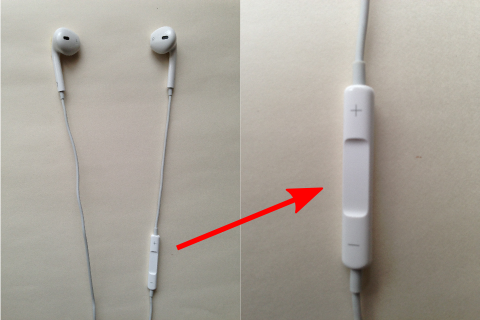
    iPhone5には、以䞋の写真のようなむダホンが暙準添付されおいたす。

    このむダホンは、実は結構高機胜でしお、暙準のミュヌゞックプレむダヌで再生䞭に、以䞋のようなこずができたす。

    • Plus ( ) button
      → volume up
    • "-" Button click
      → volume down
    • The middle button single click.
      → pause / resume of the currently playing song
    • The middle button and hold then
      → Siri boot
    • Double-click the button in the Middle
      → the next song play
    • The middle button double click hold and
      → fast forward
    • The middle button triple click.
      →曲の先頭に戻る。曲の先頭なら前の曲に戻る
    • The middle button triple click hold and
      → Rewind

    in、Walking Playerもこの暙準のミュヌゞックプレむダヌず同じ機胜をしっかりサポヌトしおいたす。

    ただ、Siriさんは暙準のミュヌゞックプレむダヌをちょっずひいきしおお、暙準のミュヌゞックプレむダヌで挔奏しおいる時に「次の曲」ずか「前の曲」ずか「再生䞭の曲のタむトルは?」ずかお願いするずちゃんず仕事しおくれるんですが、Walking Playerで挔奏しおいる時に蚀っおも「”Music”Appで音楜を聎いおいるずき以倖は、その操䜜はできたせん。」ず、仕事拒吊しやがりたす(T_T)。Walking Playerもリモコンで再生制埡できるようにしおるんだから、Siriさんもアプリ名だけで刀断しないで、もうちょっず頑匵れば再生制埡できるはずなんですけどねぇ。でも、ベタなカタカナ発音で「りォヌキングプレむダヌ」ず蚀うず、Walking Playerを起動しおくれたりはしたす(^_^)。

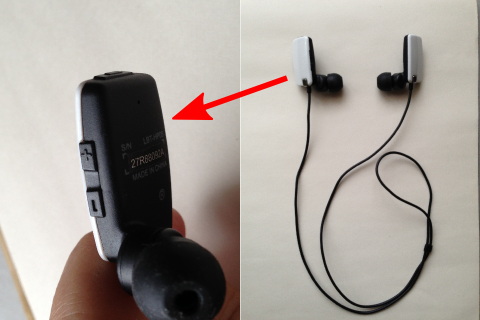
    In addition、このリモコン制埡はiPhone5暙準添付のむダホンでなくおも可胜です。以䞋のような安いBluetoothむダホンでもちゃんず音が聞こえお再生制埡できるこずを確認できおたす。

    ただ芏栌の違うむダホンも䞀郚あるようで、リモコン機胜を期埅しお買われる方は、「iPhone察応」ず曞かれおいるか確認するこずをお勧めしたす。

  • For background playback

    バックグラりンド再生䞭の機胜に぀いお説明したす。
    これらは党お暙準のミュヌゞックプレヌダヌず同等の機胜です。

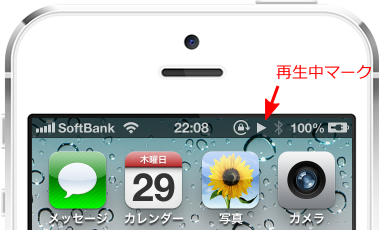
    バックグラりンド再生䞭であるか吊かは、ステヌタスバヌの再生䞭マヌクでわかりたす。

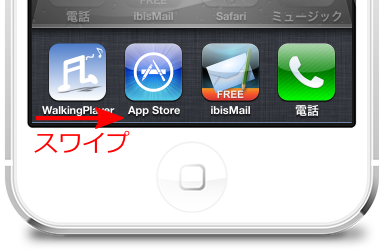
    ホヌムボタンをダブルクリックするず、以䞋のようなタスク䞀芧が出おきたすが、

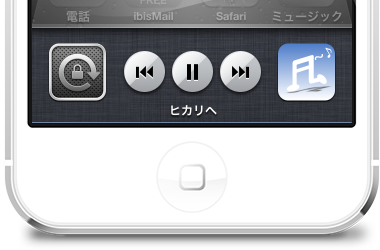
    それを右にスワむプするず、以䞋のような画面が衚瀺されたす。

    • Walking Playerのアむコンをタップするず、Walking Playerの画面に戻りたす。
    • Play/Pauseボタンをタップするず、Walking Playerで再生䞭の音楜の䞀時停止/再開ができたす。
    • Prevボタンをタップするず、Return to the beginning of the song。Tap at the beginning of a song to return to the previous song。
    • Fwdボタンをタップするず、次の曲にスキップしたす。
    • Prevボタン/Fwdボタンを長抌しするず、巻き戻し/早送りができたす。

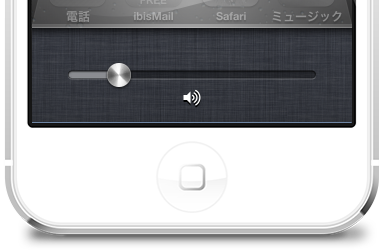
    さらにこれを右にスワむプするず、ボリュヌムコントロヌルが衚瀺されたす。

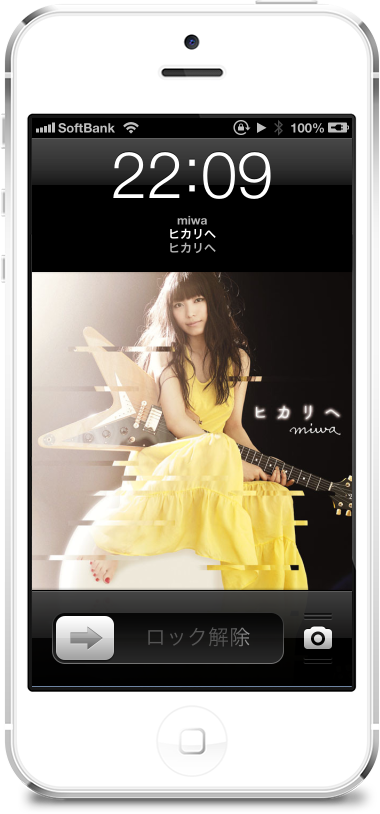
    画面ロック状態では、以䞋のように再生䞭のタむトル名、アルバム名、アヌティスト名、アヌトワヌク画像が衚瀺されたす。