About Walking Player and other similar apps、I would like to compare various。
(of course、Please note that this is from the perspective of the Walking Player author.。)
actually、When I started making this app、I didn't research the competition very deeply.。Or rather、Provide free of charge and rely on advertising revenue(If you use in the background without seeing ads in-app billing)Because it was planned for、We started development after confirming that there is no other app that automatically analyzes tempo for free.。
but、Late stage of development(Or rather、Almost before release)Become、After all, there are paid apps with a similar concept.、I'm starting to wonder how amazing it is、I bought some and tried them out.。
in、I would like to compare it with the following three paid apps that have similar concepts.。
- AudioStep
https://itunes.apple.com/jp/app/audiostep-improve-your-run/id652697216?mt=8 - Tempo Magic Pro
https://itunes.apple.com/jp/app/tempo-magic-pro/id390593407?mt=8 - BODiBEAT GPS run&Walk
https://itunes.apple.com/jp/app/bodibeat-gps-ran-u-oku/id466374538?mt=8
[Each app concept and overview]
- AudioStep
This app is、While developing Walking Player(2013About June)I found this in the latest information on the AppStore.。This is a recently released app.。The concept of this app is a little different.、Running at a tempo of 180 BPM will reduce the risk of injury.。that's why、With this app, you can change all songs to 180BPM and play them.!That seems to be what it means.。Well, actually it's not just 180BPM.、120It can be adjusted up to ~200BPM, so it can be used for walking.。but、If you want to walk a little slower at around 100-120 BPM、Not available。(95If it's BPM, convert it to a multiple of 95 x 2 = 190 BPM.、100There is no multiple value that can be adjusted to ~120BPM) - Tempo Magic Pro
This app is high price(¥ 450)So、It was excluded from the survey at the development stage.。but、The concept is very close to Walking Player。If this was released at a low price of less than 100 yen、Walking Player may not have been developed。The tempo adjustment range is(In HiFi Mode)It is possible to go from -50% to +50% of the original speed.、You can match it to any tempo by converting it into multiples.。but、I think the automatic adjustment method is a bit lenient.、For example, change the original 128BPM song to 170BPM.(+33%)I was playing it on、When the original tempo changes to 98BPM for the next song、+50%The playback tempo drops to 146BPM.。At times like this、98If you make it 85BPM with -14% of BPM、Even though you can maintain a tempo equivalent to 85 x 2 = 170 BPM in multiples.。Even if it was released at a low price, this would still be the case.、I was dissatisfied with the playback song selection function, which I will explain later.、I guess I ended up developing Walking Player.。 - BODiBEAT GPS run&Walk
This is an app released by YAMAHA, the world's leading company.。There is also a free version called "BODiBEAT Free for iPhone".、Rather than playing the songs you own,、It is not applicable because it only plays the rhythm automatically composed by the app.。“BODiBEAT GPS Run”&Walk”、You can play songs on your iPhone。A video explaining the concepthttp://www.youtube.com/watch?v=E44InxmFc8AIt's in、This is exactly the concept of Walking Player.。As expected from YAMAHA、Create an easy-to-understand PV。I almost want to change “BODiBEAT” in that video to “Walking Player.”(Lol)。but、YAMAHA's method、Rather than changing the tempo of the original song、The idea is to play songs that match the current exercise tempo with the original tempo.。In other words、Without Adjust Play mode in Walking Player、That means only Skip Play mode.。no、It's a bit of a misnomer to say it's the same as Skip Play.、What's great about this app is、Using the iPhone's acceleration sensor、Measure your current walking tempo、This means playing a song that matches that tempo.。Actually, YAMAHA、Before releasing this app, around 2009, we started using “BODiBEAT”.(http://jp.yamaha.com/support/fitness/bodibeat)They sell music players for running/walking.、I think it cost about ¥29,000 at the time.、I actually bought and used the product.。The serial number is handwritten on the warranty card.、I think I was a fairly early user.。in、The ``BODiBEAT GPS Run'' has been built directly onto the iPhone.&Walk"、I've been very dissatisfied with it for a long time.。What were you dissatisfied with?、"The song I want to hear isn't playing right now.!” That means。I don't choose it myself, but the app chooses the appropriate one.。And with that、When you get tired and slow down a little、I was also dissatisfied with being able to switch to another song in the middle of a song without permission.。I was doing my best while listening to my favorite song, but then I was changed without permission.、Even if I turn the pace back, I feel like I can only choose another song.。So、I was so dissatisfied with it that I stopped using "BODiBEAT".。After that、I've been doing this for several years by manually analyzing the tempo and manually creating a playlist of songs that match my walking style and playing them on my iPod.。and、This year, the environment for developing apps on the iPhone has been prepared.、I created Walking Player by myself to solve the dissatisfaction I had so far.。yes、Actually, the origin of Walking Player's development came from the dissatisfaction of BODiBEAT.。Walking Player's Skip Play mode is、It does not measure the tempo that you are currently walking.、That's fine。"I'm going to walk today too.!Playing the guy today suit the tempo from song of this artist just pick meee!I continued playing keep up their pace pace back from 替enaide is the tempo of the song.!” can be said、Walking Player's Skip Play mode。
but、“BODiBEAT GPS Run”&Walk” is amazing not only for playing music.、Record your driving route with GPS、Post on Facebook or Twitter、such as matching the tempo with another person、It probably has a variety of functions.。Walking Player、I decided to stop doing that altogether.、If you need something like that, you can use it with Nike+Running or another running support app.?That's what I think。
below、Let's compare each item。
1.[Price]
- AudioStep
△
¥ 170 - Tempo Magic Pro
×
¥ 450 - BODiBEAT GPS run&Walk
△
¥ 170
BODiBEAT GPS run&The walk is、9/1The campaign price is ¥85 until。 - Walking Player
○
¥ 0
In-app purchase ¥85、You can remove ads and continue playing in the background.。
2.[Supported operating systems]
- AudioStep
△
requires iOS6.1 or higher - Tempo Magic Pro
○
requires iOS5.0 or higher - BODiBEAT GPS run&Walk
○
requires iOS5.0 or higher - Walking Player
△
requires iOS6.1 or higher
3.[Japan language support]
- AudioStep
× - Tempo Magic Pro
× - BODiBEAT GPS run&Walk
○ - Walking Player
○
4.[Play song selection features]
- AudioStep
△
Create an app-specific playlist、Select a song to play from it。
Only one playlist can be registered.、Add songs to playlist later
If you try to add it, the registered playlist will be cleared first.。 - Tempo Magic Pro
△
Create an app-specific playlist、Select a song to play from it。
You can create multiple playlists、Song playback will stop while creating a playlist.。 - BODiBEAT GPS run&Walk
△
Create an app-specific playlist、Select a song to play from it。
Only one playlist can be registered.。
During playback(While working out)cannot edit playlists。 - Walking Player
○
Just like a standard music player、View albums and artists directly
You can select and play。No need to create playlists。
You can display another song list during playback.。
(Comments)
This was also pointed out in the review of Tempo Magic Pro.、You have to create a playlist specifically for the app once.、It's quite troublesome。“Today I am walking with this album.、Things like “Tomorrow I’ll be walking with another album” became a chore.、I gradually end up using only the same playlist.。Walking Player、We are aiming for a level that can be used as a replacement for standard music players.、Directly specify songs imported from CDs or purchased from iTunes Store.、Ready for walking。actually、What takes the most time in developing Walking Player?、It has the same level of song selection function as this standard music player.。
5.[Playback tempo change feature]
- AudioStep
△
Tempo changeable range is 120BPM-200BPM。
If you want to walk a little slower at around 100-120 BPM、Not available。(95If it's BPM, convert it to a multiple of 95 x 2 = 190 BPM.、100There is no multiple value that can be adjusted to ~120BPM) - Tempo Magic Pro
△
The range in which the tempo can be changed is、HiFi Mode ranges from -50% to +50% of original speed。
If you change the tempo manually、You can match it to any tempo by converting it into multiples.、Automatic adjustment function is weak、The playback tempo changes when the song changes(Not even multiple conversion)There are times when。 - BODiBEAT GPS run&Walk
×
No tempo change function。 - Walking Player
○
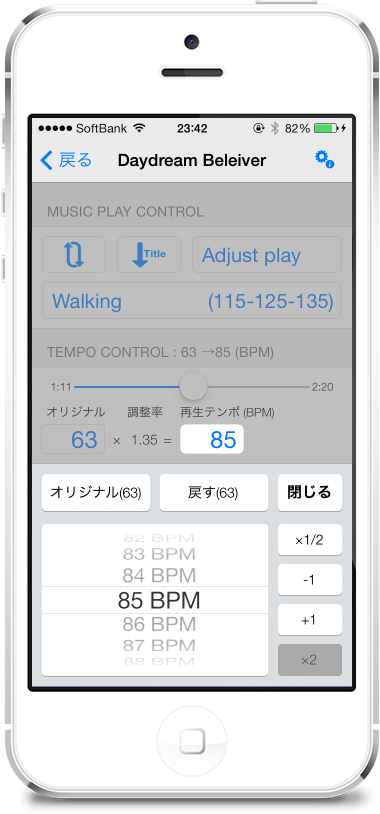
The tempo can be changed within a range of 1/2 to 2 times the original speed.。
When the original tempo and the set tempo are far apart、To adjust by converting multiples、You can continue walking at a constant tempo even if the song changes.。
6.[The ability to play only the songs fit the tempo]
- AudioStep
× - Tempo Magic Pro
× - BODiBEAT GPS run&Walk
○
Measuring exercise tempo with an acceleration sensor、play the appropriate song。 - Walking Player
○
Play only songs within the specified tempo range。
7.[Playback control]
- AudioStep
△
"Stop/Start"、"Next song" only
*There is a slider that indicates the playback position.、It's not working on my device。
*Not "pause/resume"、It will stop and start from the beginning of the song.。 - Tempo Magic Pro
△
"Pause/Resume"、"Next song"、"Previous song"、"Playback position specification slider" only - BODiBEAT GPS run&Walk
×
Unable to control playback stop/start。If you find a song that matches your exercise tempo, it will automatically play it.。
"Beginning of song"、There is only "Next song"。 - Walking Player
○
"Pause/Resume"、"Next song"、"Previous song"、"Beginning of song"、"Fast forward"、"Rewind"、
Playback position specified slider
"Pause/Resume"、Controls fade out/fade in。
*Walking Player is、Has playback control functions equivalent to standard music players。
8.[Earphone remote control support]
- AudioStep
△
"Stop/Start"、"Next song" only - Tempo Magic Pro
△
"Pause/Resume"、"Next song"、"Previous song" only - BODiBEAT GPS run&Walk
×
Does not support remote control of earphones。 - Walking Player
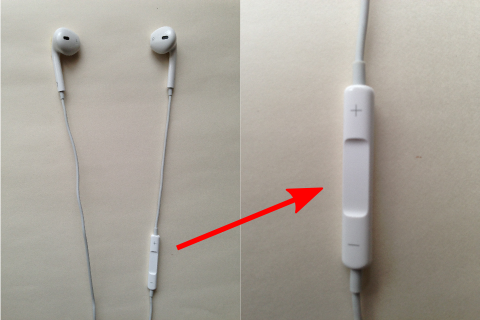
○
"Pause/Resume"、"Next song"、"Previous song"、"Beginning of song"、"Fast forward"、"Rewind"
"Pause/Resume"、Controls fade out/fade in。
*Walking Player is、Has playback control functions equivalent to standard music players。
9.[Background play]
- AudioStep
○
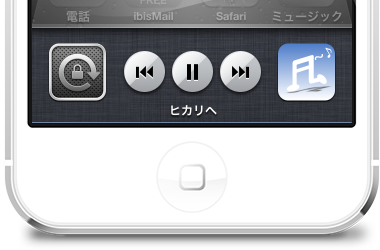
You can control playback from the NowPlaying Center screen in Task Manager.。
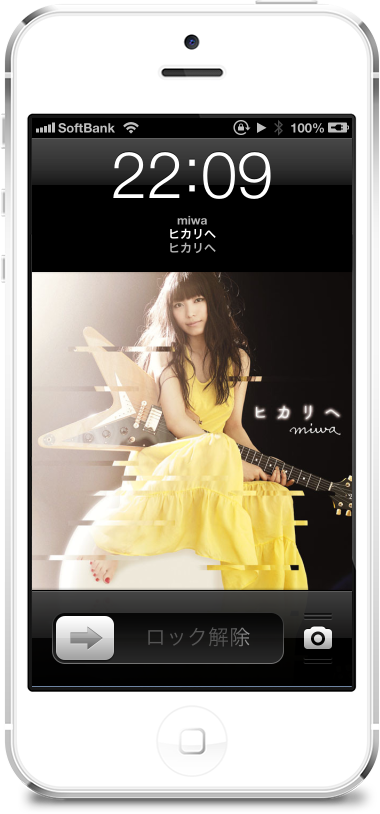
The lock screen displays not only the artwork but also the BPM adjustment value。 - Tempo Magic Pro
○
You can control playback from the NowPlaying Center screen in Task Manager.。
The resolution of the artwork display on the lock screen is low.、It's a bit dirty。 - BODiBEAT GPS run&Walk
△
Background playback is possible、Go to NowPlaying Center in Task Manager
Because it is not registered、Unable to control playback in the background。on lock screen
The currently playing song is not displayed either.。 - Walking Player
○
You can control playback from the NowPlaying Center screen in Task Manager.。
The lock screen will be an artwork screen similar to the standard music player.。
10.[Automatic tempo analysis speed]
- -AudioStep
○
With iPhone5、5Tempo analysis of a minute-long song can be completed in a few seconds.。 - Tempo Magic Pro
○
With iPhone5、5Tempo analysis of a minute-long song can be completed in a few seconds.。
To analyze tempo in the background during playback、There is almost no waiting time for tempo analysis.。 - BODiBEAT GPS run&Walk
○
With iPhone5、5Tempo analysis of a minute-long song can be completed in a few seconds.。 - Walking Player
△
With iPhone5、5Tempo analysis of a minute-long song can be completed in about 10 seconds.。
however、Analyze tempo in the background while playing。
(Comments)
The analysis time for Walking Player is a bit long.、The tempo is analyzed in the background during playback.、It doesn't bother me that much。but、Because it pales in comparison to other apps、I would like to improve it someday(NetA can be improved but there)。
11.[Playing in the back ground tempo analysis]
- AudioStep
×
Analyzes tempo when creating app-specific playlists。No other operations can be performed during this time.。 - Tempo Magic Pro
○
Analyzing tempo in the background during playback。
however、You cannot tell which song's tempo is being analyzed during playback.。 - BODiBEAT GPS run&Walk
×
Analyzes tempo when creating app-specific playlists。No other operations can be performed during this time.。 - Walking Player
○
Analyze tempo in the background while playing。
The song whose tempo is being analyzed is、Progressper will be displayed in the list of currently playing songs.。
12.[Tempo analysis accuracy]
- AudioStep
×
41% - Tempo Magic Pro
×
56% - BODiBEAT GPS run&Walk
△
81% - Walking Player
○
94%
It's self-congratulatory, but、this is amazing。I didn't expect to surpass YAMAHA.。
The results of the tempo analysis correct answer rate survey are、Click hereis。
13.[Tempo manual measurements]
- AudioStep
△
Measure with a dedicated tempo measurement screen。Can only measure from the beginning of the song。
Reference values for how many times you tapped/how many seconds were measured are not displayed.。
Measured values do not converge no matter how long it takes、How long should I tap?
I don't understand。Isn't it simply calculated by the number of taps divided by the measurement time?? - Tempo Magic Pro
△
Measure with a dedicated tempo measurement screen。Can only measure from the beginning of the song。
Reference values for how many times you tapped/how many seconds were measured are not displayed.。 - BODiBEAT GPS run&Walk
△
Measure with a dedicated tempo measurement screen。Can only measure from the beginning of the song。
Reference values for how many times you tapped/how many seconds were measured are not displayed.。
Measured values do not converge no matter how long it takes、How long should I tap?
I don't understand。Isn't it simply calculated by the number of taps divided by the measurement time?? - Walking Player
○
While playing songs(In the Tempo adjustment status)Because it is measurable、During playback
you can try measuring。Also、using the playback position slider
It can be measured from a clear rhythmic part in the middle of a song.。
A reference value will be displayed for how many times you tapped/how many seconds it took。
14.[After the tempo adjust sound quality]
- AudioStep
○
I think the sound quality after tempo adjustment is the next best after Tempo Magic Pro.。When changing tempo、The sound is slightly interrupted。 - Tempo Magic Pro
○
I think the sound quality after tempo adjustment is the best.。The sound is designed so that it does not cut off due to speed changes when changing the tempo.。 - BODiBEAT GPS run&Walk
×
No tempo adjustment function。 - Walking Player
△
The real-time followability of tempo adjustment is the best.、There are no interruptions in the sound、If you play a ballad-type song with a strong vibrato in slow motion, the sound quality may deteriorate noticeably.。
(Comments)
Walking Player、Music player library provided as standard by the OS(AVAudioPlayer)I am adjusting the playback speed using。The ability to follow speed changes is excellent.、It seems that the sound quality after the change is not very good.。Other apps、I think you are probably creating your own library and adjusting it.。I would like to do more research and development on Walking Player here.。
[Scoring results]
| Item | AS | TM | BB | WP |
|---|---|---|---|---|
| 1.[Price] | △ | × | △ | ○ |
| 2.[Supported operating systems] | △ | ○ | ○ | △ |
| 3.[Japan language support] | × | × | ○ | ○ |
| 4.[Play song selection features] | △ | △ | △ | ○ |
| 5.[Playback tempo change feature] | △ | △ | × | ○ |
| 6.[The ability to play only the songs fit the tempo] | × | × | ○ | ○ |
| 7.[Playback control] | △ | △ | × | ○ |
| 8.[Earphone remote control support] | △ | △ | × | ○ |
| 9.[Background play] | ○ | ○ | △ | ○ |
| 10.[Automatic tempo analysis speed] | ○ | ○ | ○ | △ |
| 11.[Playing in the back ground tempo analysis] | × | ○ | × | ○ |
| 12.[Tempo analysis accuracy] | × | × | △ | ○ |
| 13.[Tempo manual measurements] | △ | △ | △ | ○ |
| 14.[After the tempo adjust sound quality] | ○ | ○ | × | △ |
| The number 1's(2Point) | 3 | 5 | 4 | 11 |
| Decrease the number of(1Point) | 7 | 5 | 5 | 3 |
| X the number of(0Point) | 4 | 4 | 5 | 0 |
| The total number of | 13 | 15 | 13 | 25 |
The result seemed to be favoring Walking Player.、I in no way intended to give Walking Player a favorable rating.。just、The important functions and unimportant functions differ depending on the person.、Some people may feel that the comparison items included are biased.。For example, those items are important for those who want an all-in-one GPS tracking function and Twitter posting function like BODiBEAT.、The song selection function and playback control function, which are important for the usability of a music player, probably don't matter.。
at least、I intend to look fairly at the merits and demerits of each of the items I have covered this time.。Due to this comparison、I was able to confirm that the level of realization of what the author believes is important is not inferior to other apps.。on the other hand、The current Walking Player has a slow automatic tempo analysis speed.、I also noticed an issue with poor sound quality after adjusting the tempo.。I would like to seriously work on this point in the future.。
To be honest, it is superior to Magic Tempo Pro which costs ¥450 in many aspects.、I thought for a moment that it would have been a good idea to charge a fee.、There will be no charge for it now.(Maybe ^ ^;)。Used by many people、I would like to do my best to stand at the top of the tempo adjustment music player.。