
「Player screen”, tap “Playback tempo display”、A screen like the one below will appear.、You can freely change the tempo of the song being played。
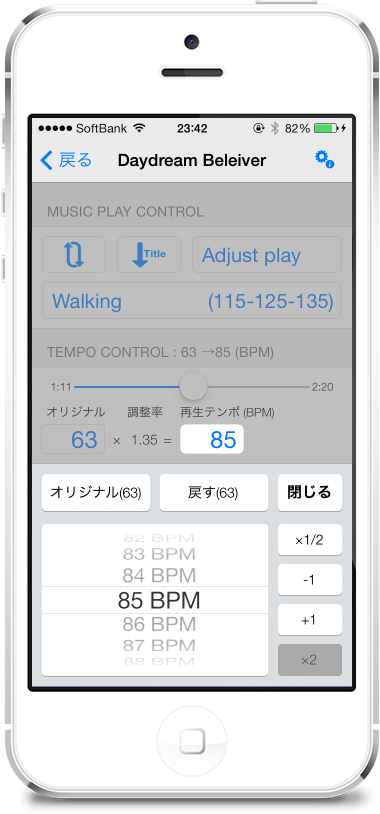
(Description of the screen parts)
- The original button
Set the playback tempo to the original song tempo。 - 'Back' button
Returns the playback tempo to the tempo at the start of this screen display.。 - "x1/2" button、"x2" button
Playback tempo 1/2、or double。 - "-1" button、“+1” button
Increase playback tempo by -1 or +1。
Long press this button to repeat、Press and hold to change playback tempo in real time。 - Picker(Drum)
Changes the playback tempo to the specified value。The playback tempo changes after the drums come to rest。 - The 'exit' button
Exit this screen。Tap the semi-transparent panel at the top of the screen or、Even if the song being played ends、This screen will close。
(Supplemental information)
- Adjusting the tempo to match your own pace while walking、Picker(Drum)Rather than adjusting by turning、"-1" button、It is better to adjust with the "+1" button because the playback tempo changes in real time.、It's easy to do。