
To manually measure the tempo of the currently playing song、「Player screen” Tap “Original tempo display”。
Then、A screen like the one below will appear.。
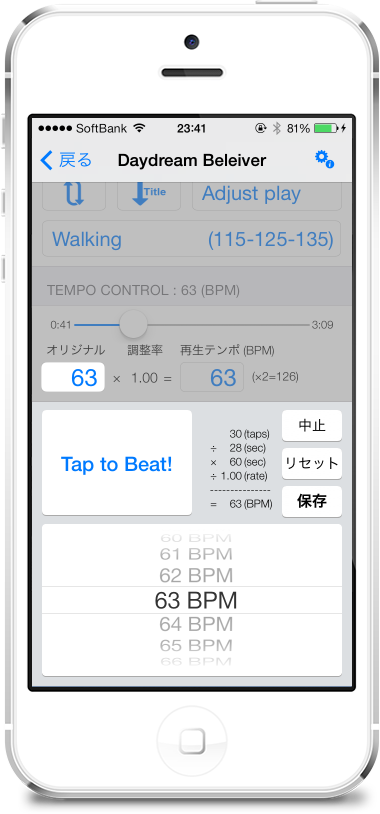
(Tempo measuring method)
- According to the beat of the song being played、「Tap to Beat!” button repeatedly.。
- The tempo value is recalculated each time you tap.、Picker(Drum)The selected value will change.。
- For a while(10-About 20 times)If you tap repeatedly、Picker(Drum)The selection value of will gradually become stable.。
- Once the numbers are stable、That's the measured tempo of the song。
- Just press the “Save” button、The measured tempo will be registered.。
(Supplemental information)
- If you fail to tap and want to try again, press the "Reset" button。When you press the "Reset" button, the picker(Drum)The selected value will be "CLEAR"。
- If you press the "Save" button with "CLEAR" selected,、The currently registered manual measurement tempo value will be cleared.。Clearing the manual measurement tempo value、The value of the music property or auto-analyzed tempo is used as the original tempo。
- If you know the correct tempo in advance、Do not tap "Tap to Beat"、picker yourself(Drum)You can also specify the tempo value directly by turning。
- To exit this screen, press the "Cancel" button or、Tap the translucent panel at the top of the screen。in this case、The tempo being measured is not reflected.。Also、Even if the song being played ends、This screen will close。
- The timing of the tap、It's okay if it's not exactly accurate。Tempo calculation is、It is calculated based on how many times you tap in seconds.、What matters is the number of taps。There is no problem with fluctuations in tap timing.。however、If you want to stabilize the measured value quickly with a small number of taps,、Make the timing of your first tap as accurate as possible。If the timing of the first tap is off、It will take time for the measured value to stabilize.。If you fail the first tap and the measured value does not stabilize easily,、It may be better to press the "reset" button and re-measure.。