Author: TakechanSoft

  • Walking Player Version1.10 has been released!

    Walking Player Version1.10 has been released!

    This release is、We have made significant improvements to the GUI.。

    (The main enhancement items)
    - Updated icon and startup screen。
    -Support iOS7 flat GUI images(only iOS7)。
    Now you can change a whole choice screen color(only iOS7)。
    -Playlists and artist list in the album artwork representative
    Now displayed。
    -You can now select the playback order and set tempo using the picker.。
    ・When the title is long, it is now scrolled.。
    -You can now display the level meter of the song being played.。
    (The level meter、You can also turn it off by setting。)
    ·others、Made minor layout changes。

    The new GUI image 'Walking Player screen descriptionPlease refer to。

    Especially the screen for iOS7、You can also change the screen color to your preference.、I think this is an app that you can feel comfortable using as your companion.。Please update and use it.。

  • How to use Nike running and Player Walking together

    See how to use Nike Running and Player Walking together?I received this question from several people,、I would like to explain how。
    no、It's not that difficult。But if you ask me a question,、I think there are many people who want to do that.。I'd like to explain to you now that it's easy.。

    [And Nike running apps]
    And Nike running apps、A running support app released by Nike.、You can download it for free。Just keep it in your pocket while running、Records and reports your mileage and pace。Or rather、than I can explain、It will be easier to understand if you look at the page below.。
    http://nikeplus.nike.com/plus/products/gps_app/

    By the way、iPhone comes with an app called ``Nike+iPod'' installed from the beginning.、Although they look similar, they are different from "Nike+Running"。“Nike+iPod” is、You cannot use it unless you purchase a sensor called "Nike + iPod Sensor"。(Description of the Nike iPod click herehttp://www.apple.com/jp/ipod/nike/)
    But "Nike + iPod" should also be usable with Walking Player as long as it has a sensor.。
    For “Nike+Running”、Just download the app for free and use it。

    Well then、Learn how to use Nike+Running and Walking Player together。

    1.first、Launch the Nike+Running app。
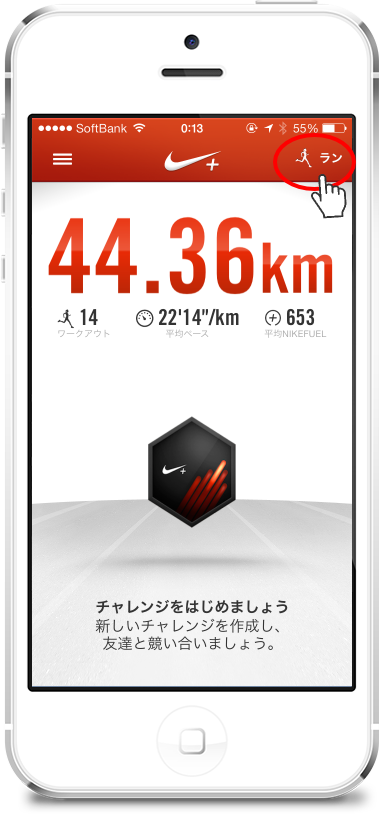
    Now, tap the "Run" button at the top right of the screen.、The screen will look like this:。

    2.This is important。Or rather、There are no other points to note other than this!
    on this screen、Set BGM to "None"。
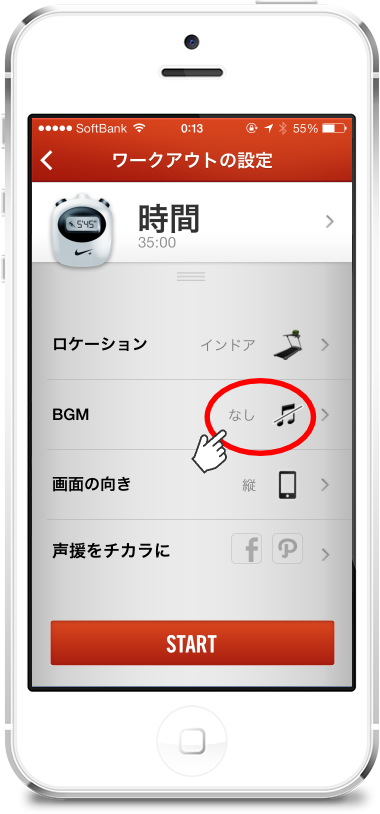
    Then tap the "START" button、Workout begins。

    3.This is the screen while working out。
    here、Tap the home button to return to the home screen。
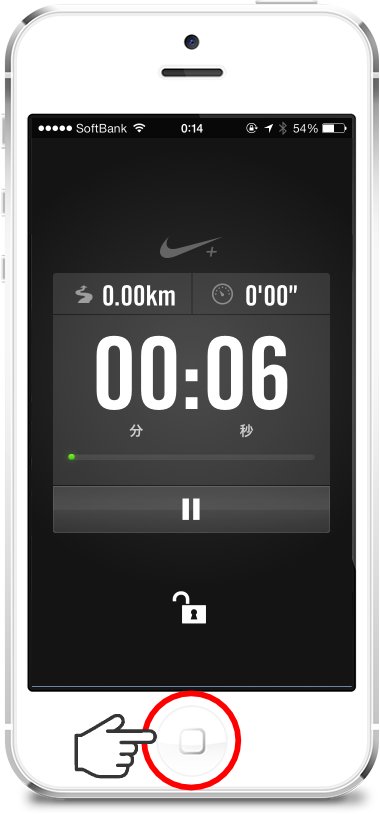
    Even if you return to the home screen、The workout continues in the background.、Mileage is counted correctly。

    4.Launch Walking Player from the home screen。
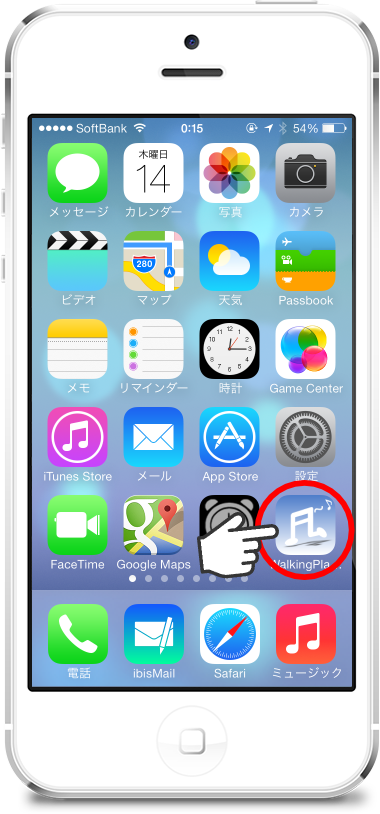
    5.Walking Player、Play your favorite songs at your favorite tempo。
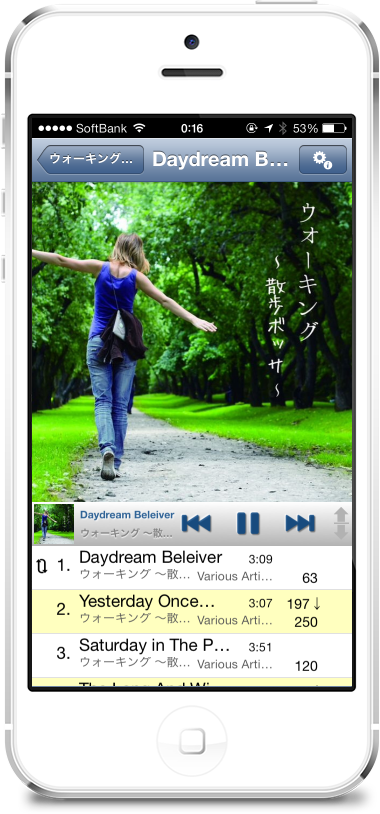
    Now、While playing a song with Walking Player、Nike+Running measures your mileage in the background。Also、Nike+Running periodically displays the message “xx minutes have passed.、It will give you a voice report such as "Distance traveled xx km".、At that time, the volume of Walking Player will be reduced a little.、Reports can now be heard properly.。When the report is finished, playback will resume at the original volume.。

    Remove the functional restrictions of Walking Player、If background playback is turned on、Both Nike+Running and Walking Player work in the background。Or rather、What happens when you keep your iPhone in your pocket while running?、I think it is better to run both in the background so that the screen does not react.。In addition、in this case、Start playing with Walking Player first.、You can start your Nike+Running workout later.。

    Well then、Please do your best to exercise today too~

  • back features by the swipe of a iOS7

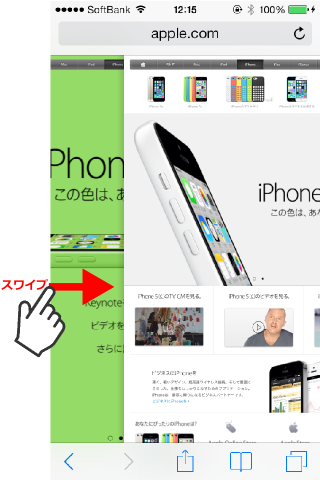
    iOS7 Safari、By swiping right from the left edge of the screen、The browser's "back" function is executed。
    (Safari screen)

    *The trick is to start swiping from the left edge of the screen as far as possible.。

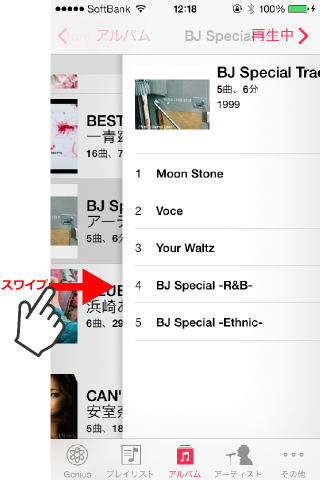
    This thing is、It is often introduced on various sites.、Actually, this feature is not only available in Safari.、With standard apps such as the “Music” app or the “Memo” app.、It is also effective in situations where details are selected and displayed from a list.。
    (If you screen)

    Actually, this function、This is a standard feature implemented in the UINavigationController class of the iOS7 SDK.。that's why、An app built using the iOS7 SDK、Apps using UINavigationController、(Unless you don't change the touch action)This feature is automatically provided。
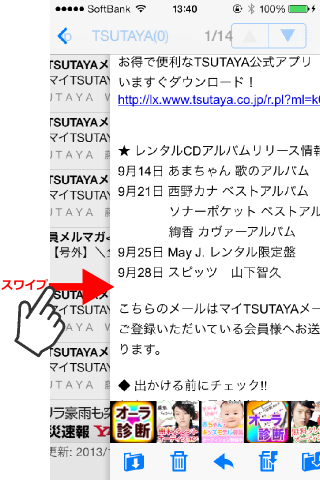
    for example、My favorite email app, ibisMail, is also available.、Now supports iOS7 flat GUI image、This app also has the swipe-to-back function enabled.。
    (ibisMail screen)

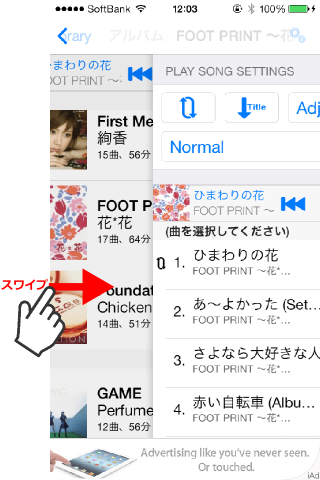
    Walking Player is also currently developing a version that supports flat GUI images for iOS7.、Similarly, the swipe-to-back function is expected to be enabled.。
    (Developing Walking Player screen)

    Now、The revised release of Walking Player has been delayed a little.、In addition to simply supporting flat GUI images for iOS7、We have also implemented several user interface improvements common to iOS7/iOS6.。I think it's worth updating even for those who are still using iOS6.。Please wait for a while until release。

  • Failure in iOS7 on walking Player v1.02

    I found one problem when running Walking Player v1.02 on iOS7.。
    This is a common problem even with standard music players.、Does not occur on iOS6.1。
    We have investigated the behavior of Walking Player and found that there is a problem with the iOS7 music library API.、I plan to report the bug to Apple and wait for a response.、Due to problems in special conditions、Apple may not be able to fix it right away.。Explanation of the problem phenomenon and workaround methodbug iOS7 you work for”, so、If you are having trouble,、Please use this article as a reference.。

  • bug iOS7 you work for

    Now、We are currently developing a version of Walking Player compatible with iOS7 flat GUI.、In such a situation, I found a problem with the standard music app.、I'll summarize it。
    This is a problem under special conditions.、If you are having trouble with strange behavior、I hope this article is helpful.。

    [Problem description]
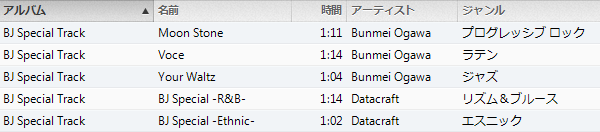
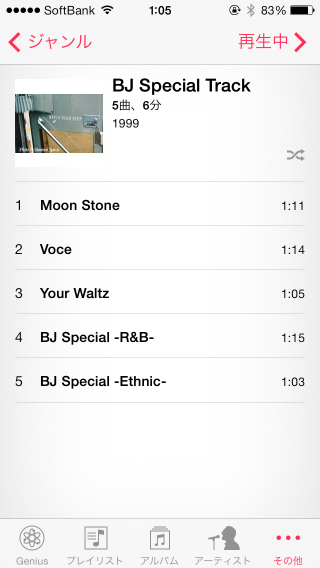
    in my music library、Contains the following album called "BJ Special Track"。

    This album is a little different from others.、The point is that the album contains a mixture of multiple genres.。generally、1All songs in one album are from the same genre.。The problem occurs when、When there are multiple genres in one album like this。
    (This album is、I'm sure a long time ago、It was included as a free sample in some computer or app.、Perhaps many people have it unconsciously.)

    Problem generating operation
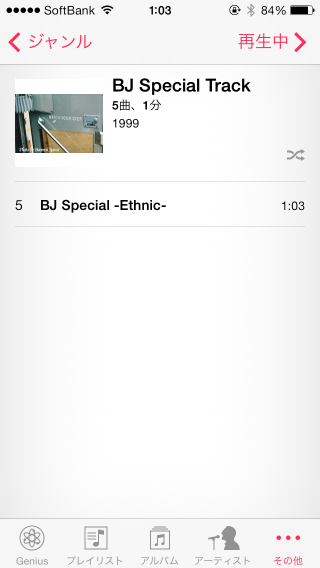
    After stopping/restarting the music app、[Genre]-[Ethnic]If you choose、as below screen[BJ Special Track]Ethnic genres in the album said that during[BJ Special-Ethnic-]Only the songs will be narrowed down and displayed.。this is the correct display。(``5 songs、1minute” is displayed.、I think it's strange that the playback time is 1 song, but the number of songs is 5 songs from the entire album.、This is not a big problem and is a separate issue from this issue, so I will close my eyes.。)

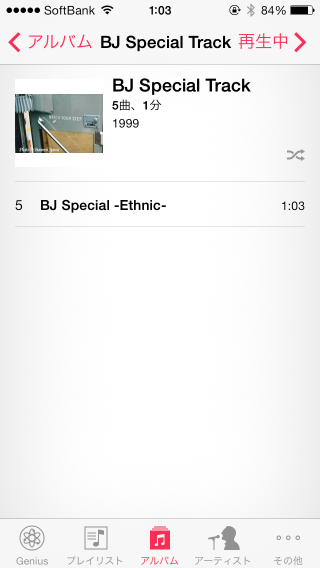
    Subsequently、[Album]-[BJ Special Track]If you choose、as below screen[BJ Special-Ethnic-]Only the song called、No other songs are displayed。

    This screen is not filtered by genre.、I need to display all 5 songs on this album.、This means you won't be able to listen to all the songs on the album.。

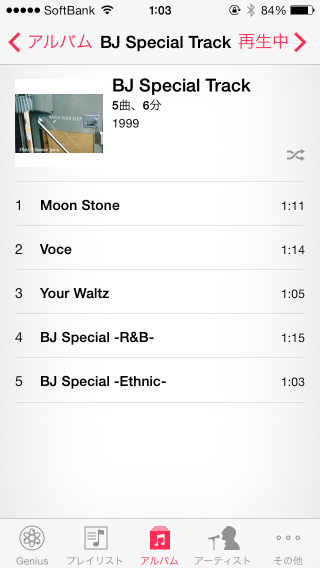
    next、After stopping/restarting the music app again、[Album]-[BJ Special Track]If you choose、This time, all 5 songs will be displayed as shown in the screen below.。This is the correct display。

    but、Subsequently[Genre]-[Ethnic]If you choose、As shown in the screen below, all 5 songs are displayed without being narrowed down by genre.。

    Actually, this same problem occurs with Walking Player v1.02 on iOS7.。(In iOS6.1、Neither the standard Music app nor Walking Player have this problem。)

    [Workaround]
    Anyway, I restarted the app、Whichever you access first will be displayed correctly.。

    [Future response plans]
    We investigated the above phenomenon by checking the operation of Walking Player.、It is known that there is a problem with iOS7's music library access API.、I plan to file a separate bug report with Apple.。just、This is a problem under special conditions.、It may not be fixed right away。

  • IOS 7 walking Player support

    2013/9/18(9 / 19 in Japan)to、iOS7(the most recent OS for iPhone)has been released to the public。

    Walking Player v1.02、Operation has been confirmed on the pre-release version of iOS7 for developers.。
    Also、9/18It also works without problems on the officially released version of iOS7, which was released to the public in。
    *The pre-release version of iOS7 for developers and the official release version of iOS7 are、I confirmed that the build numbers are the same and there are no differences.。

    For those updating the OS to iOS7、Please also update Walking Player to the latest version.。

    In addition、Walking Player v1.02 runs on iOS7 with the same GUI image as iOS6.1。
    Support for new GUI images for iOS7 is currently under development.。It will be released as soon as possible。

  • Walking Player Version1.02 has been released!

    Walking Player Version1.02 has been released!

    In this version、The following fixes have been made。

    • iOS 7 readiness
      iOS7(Developer pre-release)We have confirmed the operation and fixed the problem of unplayable judgment and display disorder.。
    • Improved automatic tempo adjustment specifications in Adjust play mode。
    • We have improved the specifications so that playback continues as much as possible even when receiving music library change notifications.。

    10/18For those who are upgrading their OS to iOS7, which is scheduled to be released.、Please also update Walking Player.。

    *This release is、Even when running on iOS7, the GUI image is displayed as before.。Compatibility with the new GUI image of iOS7、It will be supported after the official release of iOS7。

  • Tempo rate survey results

    How accurately can Walking Player and similar apps' automatic tempo analysis feature measure tempo?、I checked the accuracy rate。

    (Songs used in the survey)

    Kana Nishino's album、96 songs from singles were measured.。

    (Survey app)

    'WP':Walking Player v1.01
    AS:AudioStep v1.01
    'TM':Tempo Magic Pro v3.0
    'BB':BODiBEAT GPS run&Walk v1.1.5

    (For the survey results)

    • AudioStep、The BPM value is displayed to the third decimal place.、Rounded off and expressed as an integer value。
    • Items with “x” in the measurement result column、The app says "unmeasurable"。

    (Correct method)

    Compare the automatic measurement results of each app with the manual measurement results.、If the difference from the manual measurement result was within ±1, it was considered correct.。Also、If the difference in the result of multiple adjustment was within ±1, it was also considered correct.。
    (Example)Automatic measurement results:50、Manual measurement results:101in the case of、50Comparing ×2=100 with the manual measurement results, it was determined to be the correct answer.。

    (Rate Roundup)

    App name Correct answer rate
    Walking Player v1.01 94%
    AudioStep v1.01 41%
    Tempo Magic Pro v3.0 56%
    BODiBEAT GPS run&Walk v1.1.5 81%

    (Study on)

    • All three apps other than Walking Player have a certain number of results that are "unmeasurable".、Walking Player、On the analysis algorithm、Never become unmeasurable。What is Walking Player and the other 3 apps?、I suspect that the way tempo is measured is fundamentally different.。
    • BODiBEAT is、Except for the unmeasurable、There are 3 cases with an error of ±2 that gave incorrect values.、There are only two errors larger than that, so、Excellent for the results。however、There are 12 cases that cannot be measured.、I lowered my accuracy rate by that amount.。
    • AudioStep、Tempo Magic Pro is、The accuracy rate is lower than expected。Half needs to be measured manually。
    • Kana Nishino's album、There is a 1 minute prologue/epilogue song at the beginning and end of the album.、There is also a narration-like story within it.、Those songs seem difficult to analyze。Of the 6 things Walking Player got wrong、4This is the prologue song/epilogue song.。vice versa、I think it can be said that it is excellent that there are only 2 errors in a normal song.。

    (Result details)


    Title Album title Artist Measurement results(BPM value) Accuracy determination
    WP AS TM BB Manual WP AS TM BB
    *Prologue * ~ Kirari ~ LOVE one. Kana Nishino 199 100 x 99 100 ×
    Even farther LOVE one. Nishino Kana Feat. WISE 60 160 120 120 120 ×
    doll LOVE one. Kana Nishino 127 127 126 127 127
    Girlfriend LOVE one. Kana Nishino 54 108 x x 108 × ×
    To your voice LOVE one. Nishino Kana Feat. VERBAL 187 x 94 94 94 ×
    Style. LOVE one. Kana Nishino 113 113 113 x 113 ×
    Life goes on… LOVE one. Kana Nishino 54 x 109 107 108 ×
    I LOVE one. Kana Nishino 126 126 128 125 126 ×
    Candy LOVE one. Kana Nishino 65 174 98 129 130 × ×
    MAKE UP LOVE one. Kana Nishino 118 119 116 118 118 ×
    glowly days LOVE one. Kana Nishino 135 135 134 135 135
    Celtic LOVE one. Kana Nishino 101 101 x 152 151 × × ×
    You want to see from LOVE one. Kana Nishino 88 x 87 88 88 ×
    *Epilogue * ~ LOVE one...- LOVE one. Kana Nishino 200 x 131 x 100 × × ×
    More... More... Kana Nishino 180 121 178 180 90 × ×
    missing you More... Kana Nishino 196 98 78 97 98 ×
    Dear My Friends More... Kana Nishino 129 129 130 128 129
    Dear… Dear… / MAYBE Kana Nishino 85 x 85 85 85 ×
    MAYBE Dear… / MAYBE Kana Nishino 128 x 128 128 128 ×
    Yours only, ~ Maison de
    m-flo-
    Dear… / MAYBE Nishino Kana Feat. WISE 70 112 140 139 140 ×
    Best Friend Best Friend Kana Nishino 117 157 117 116 117 ×
    ONE WAY LOVE Best Friend Kana Nishino 101 101 100 101 101
    Tonight's PARTY UP Best Friend Kana Nishino 125 125 125 249 125
    Aitakute, aitakute I want to see society wasAnd Kana Nishino 110 x x 110 110 × ×
    LOVE IS BLIND I want to see society wasAnd Kana Nishino 128 128 129 x 128 ×
    Grab Bag I want to see society wasAnd Kana Nishino 60 123 119 119 120 ×
    *Prologue * ~ What a nice ~ to LOVE Kana Nishino 196 x 102 x 120 × × × ×
    Best Friend to LOVE Kana Nishino 117 157 155 116 117 × ×
    Summer Girl to LOVE Nishino Kana Feat. MINMI 62 124 123 124 124
    Hey Boy to LOVE Kana Nishino 72 96 143 72 143 ×
    More... to LOVE Kana Nishino 180 121 177 180 90 × ×
    love & smile to LOVE Kana Nishino 90 90 90 x 90 ×
    Up until this to LOVE Kana Nishino 150 149 149 74 150 ×
    MAYBE to LOVE Kana Nishino 128 x 127 128 128 ×
    WRONG to LOVE Kana Nishino 123 123 122 122 123
    Come On Yes Yes Oh Yeah!! to LOVE Kana Nishino 125 125 109 125 125 ×
    Dear… to LOVE Kana Nishino 85 x 84 85 85 ×
    Aitakute, aitakute to LOVE Kana Nishino 110 x x 110 110 × ×
    You are the one to LOVE Kana Nishino 184 123 150 91 92 × ×
    *Epilogue * ~ to LOVE ~ to LOVE Kana Nishino 196 x 118 x 119 × × ×
    If If Kana Nishino 123 163 123 122 123 ×
    I & # 8217s; ll be there If Kana Nishino 75 x 143 150 150 × ×
    Beautiful If Kana Nishino 143 143 143 71 143
    You're You're Kana Nishino 72 x 97 72 72 × ×
    Christmas Love You're Kana Nishino 122 162 121 121 122 ×
    GIRLS GIRLS You're Kana Nishino 87 114 84 86 87 × ×
    Distance Distance Kana Nishino 140 94 139 70 140 ×
    beloved Distance Kana Nishino 87 x 82 86 87 × ×
    Call Me Up Distance Kana Nishino 50 133 80 x 100 × × ×
    Esperanza Esperanza Kana Nishino 56 112 111 x 112 ×
    Thinking of you Esperanza Kana Nishino 178 120 113 89 89 × ×
    ONLY ONE Esperanza Kana Nishino 128 129 114 128 128 ×
    *Prologue * ~Sunrise~ Thank you, Love Kana Nishino 108 x x 108 108 × ×
    Esperanza Thank you, Love Kana Nishino 56 112 112 112 112
    Clap Clap!! Thank you, Love Kana Nishino 163 109 81 81 82 ×
    Together Thank you, Love Kana Nishino 90 180 90 89 90
    Distance Thank you, Love Kana Nishino 140 x 139 69 140 × ×
    I & # 8217s; ll be there Thank you, Love Kana Nishino 75 x 106 150 75 × ×
    Flower Thank you, Love Kana Nishino 150 150 75 x 150 ×
    Every Boy Every Girl Thank you, Love Kana Nishino 128 128 116 x 128 × ×
    Where are you? Thank you, Love Kana Nishino 123 123 122 122 123
    If Thank you, Love Kana Nishino 123 164 123 122 123 ×
    Alright Thank you, Love Kana Nishino 120 120 120 120 120
    You're Thank you, Love Kana Nishino 72 x 96 72 72 × ×
    Wishing Thank you, Love Kana Nishino 73 x 147 73 73 ×
    *Epilogue * ~Thank you,
    Lovely
    Thank you, Love Kana Nishino 108 108 90 81 108 × ×
    たとえ どんなに... たとえ どんなに... Kana Nishino 180 90 90 179 90
    Just the way you are たとえ どんなに... Kana Nishino 184 92 91 92 92
    Secret たとえ どんなに... Kana Nishino 133 x 143 130 131 × × ×
    SAKURA, I love you? SAKURA, I love yoyou? Kana Nishino 176 118 100 176 176 × ×
    My Baby SAKURA, I love yoyou? Kana Nishino 65 x 130 130 130 ×
    sweet sweet SAKURA, I love yoyou? Kana Nishino 170 113 111 166 170 × × ×
    私たち 私たち Kana Nishino 180 177 90 90 90 ×
    Happy Half Year! 私たち Kana Nishino 97 129 123 97 97 × ×
    LOVE LIKE CRAZY 私たち Kana Nishino 132 132 131 66 132
    GO FOR IT!! GO FOR IT!! Kana Nishino 147 118 147 73 147 ×
    TALK TO ME GO FOR IT!! Kana Nishino 180 x 90 179 180 ×
    SUMMER TIME GO FOR IT!! Kana Nishino 128 128 133 127 128 ×
    *Prologue * ~Welcome~ Love Place Kana Nishino 185 x x x 91 × × × ×
    私たち Love Place Kana Nishino 180 173 x 90 90 × ×
    Day 7 Love Place Kana Nishino 159 107 106 159 159 × ×
    GO FOR IT!! Love Place Kana Nishino 147 117 147 73 147 ×
    Be Strong Love Place Kana Nishino 199 100 100 x 100 ×
    Happy Half Year! Love Place Kana Nishino 97 129 124 97 97 × ×
    Love Song Love Place Kana Nishino 168 168 83 83 168 × ×
    FANTASY Love Place Kana Nishino 90 90 89 90 90
    Is this love? Love Place Kana Nishino 131 131 130 131 131
    Honey Love Place Kana Nishino 137 140 136 136 136 ×
    SAKURA, I love you? Love Place Kana Nishino 176 118 94 87 88 × ×
    たとえ どんなに... Love Place Kana Nishino 180 90 119 179 90 ×
    kiss & hug Love Place Kana Nishino 86 172 85 85 86
    My Place Love Place Kana Nishino 164 109 109 165 164 × ×
    *Epilogue * ~Love Place~ Love Place Kana Nishino 185 x 96 96 97 × ×
    Always Always Kana Nishino 160 161 80 80 80
    Happy Song Always Kana Nishino 135 135 135 135 135
    Love you, Miss you Always Kana Nishino 130 x 128 130 130 × ×
    正解数 90 39 54 78
    不正解数 6 57 42 18
    Correct answer rate 93.75% 40.63% 56.25% 81.25%
    不正解率 6.25% 59.38% 43.75% 18.75%
  • For a comparison of walking Player and similar apps

    About Walking Player and other similar apps、I would like to compare various。
    (of course、Please note that this is from the perspective of the Walking Player author.。)

    actually、When I started making this app、I didn't research the competition very deeply.。Or rather、Provide free of charge and rely on advertising revenue(If you use in the background without seeing ads in-app billing)Because it was planned for、We started development after confirming that there is no other app that automatically analyzes tempo for free.。

    but、Late stage of development(Or rather、Almost before release)Become、After all, there are paid apps with a similar concept.、I'm starting to wonder how amazing it is、I bought some and tried them out.。

    in、I would like to compare it with the following three paid apps that have similar concepts.。

    [Each app concept and overview]

    • AudioStep
      This app is、While developing Walking Player(2013About June)I found this in the latest information on the AppStore.。This is a recently released app.。The concept of this app is a little different.、Running at a tempo of 180 BPM will reduce the risk of injury.。that's why、With this app, you can change all songs to 180BPM and play them.!That seems to be what it means.。Well, actually it's not just 180BPM.、120It can be adjusted up to ~200BPM, so it can be used for walking.。but、If you want to walk a little slower at around 100-120 BPM、Not available。(95If it's BPM, convert it to a multiple of 95 x 2 = 190 BPM.、100There is no multiple value that can be adjusted to ~120BPM)
    • Tempo Magic Pro
      This app is high price(¥ 450)So、It was excluded from the survey at the development stage.。but、The concept is very close to Walking Player。If this was released at a low price of less than 100 yen、Walking Player may not have been developed。The tempo adjustment range is(In HiFi Mode)It is possible to go from -50% to +50% of the original speed.、You can match it to any tempo by converting it into multiples.。but、I think the automatic adjustment method is a bit lenient.、For example, change the original 128BPM song to 170BPM.(+33%)I was playing it on、When the original tempo changes to 98BPM for the next song、+50%The playback tempo drops to 146BPM.。At times like this、98If you make it 85BPM with -14% of BPM、Even though you can maintain a tempo equivalent to 85 x 2 = 170 BPM in multiples.。Even if it was released at a low price, this would still be the case.、I was dissatisfied with the playback song selection function, which I will explain later.、I guess I ended up developing Walking Player.。
    • BODiBEAT GPS run&Walk
      This is an app released by YAMAHA, the world's leading company.。There is also a free version called "BODiBEAT Free for iPhone".、Rather than playing the songs you own,、It is not applicable because it only plays the rhythm automatically composed by the app.。“BODiBEAT GPS Run”&Walk”、You can play songs on your iPhone。A video explaining the concepthttp://www.youtube.com/watch?v=E44InxmFc8AIt's in、This is exactly the concept of Walking Player.。As expected from YAMAHA、Create an easy-to-understand PV。I almost want to change “BODiBEAT” in that video to “Walking Player.”(Lol)。but、YAMAHA's method、Rather than changing the tempo of the original song、The idea is to play songs that match the current exercise tempo with the original tempo.。In other words、Without Adjust Play mode in Walking Player、That means only Skip Play mode.。no、It's a bit of a misnomer to say it's the same as Skip Play.、What's great about this app is、Using the iPhone's acceleration sensor、Measure your current walking tempo、This means playing a song that matches that tempo.。Actually, YAMAHA、Before releasing this app, around 2009, we started using “BODiBEAT”.(http://jp.yamaha.com/support/fitness/bodibeat)They sell music players for running/walking.、I think it cost about ¥29,000 at the time.、I actually bought and used the product.。The serial number is handwritten on the warranty card.、I think I was a fairly early user.。in、The ``BODiBEAT GPS Run'' has been built directly onto the iPhone.&Walk"、I've been very dissatisfied with it for a long time.。What were you dissatisfied with?、"The song I want to hear isn't playing right now.!” That means。I don't choose it myself, but the app chooses the appropriate one.。And with that、When you get tired and slow down a little、I was also dissatisfied with being able to switch to another song in the middle of a song without permission.。I was doing my best while listening to my favorite song, but then I was changed without permission.、Even if I turn the pace back, I feel like I can only choose another song.。So、I was so dissatisfied with it that I stopped using "BODiBEAT".。After that、I've been doing this for several years by manually analyzing the tempo and manually creating a playlist of songs that match my walking style and playing them on my iPod.。and、This year, the environment for developing apps on the iPhone has been prepared.、I created Walking Player by myself to solve the dissatisfaction I had so far.。yes、Actually, the origin of Walking Player's development came from the dissatisfaction of BODiBEAT.。Walking Player's Skip Play mode is、It does not measure the tempo that you are currently walking.、That's fine。"I'm going to walk today too.!Playing the guy today suit the tempo from song of this artist just pick meee!I continued playing keep up their pace pace back from 替enaide is the tempo of the song.!” can be said、Walking Player's Skip Play mode。
      but、“BODiBEAT GPS Run”&Walk” is amazing not only for playing music.、Record your driving route with GPS、Post on Facebook or Twitter、such as matching the tempo with another person、It probably has a variety of functions.。Walking Player、I decided to stop doing that altogether.、If you need something like that, you can use it with Nike+Running or another running support app.?って考えです

    以下項目別に比較してみます

    1.[Price]

    • AudioStep

      ¥ 170
    • Tempo Magic Pro
      ×
      ¥ 450
    • BODiBEAT GPS run&Walk

      ¥ 170
      BODiBEAT GPS run&ウォークは、9/1までキャンペーン価格¥85です
    • Walking Player

      ¥ 0
      アプリ内課金¥85で広告削除とバックグラウンド再生継続ができます

    2.[Supported operating systems]

    • AudioStep

      requires iOS6.1 or higher
    • Tempo Magic Pro

      requires iOS5.0 or higher
    • BODiBEAT GPS run&Walk

      requires iOS5.0 or higher
    • Walking Player

      requires iOS6.1 or higher

    3.[Japan language support]

    • AudioStep
      ×
    • Tempo Magic Pro
      ×
    • BODiBEAT GPS run&Walk
    • Walking Player

    4.[Play song selection features]

    • AudioStep

      アプリ専用のプレイリストを作成しその中から再生曲を選択します
      プレイリストが1個しか登録できず後でプレイリストに曲を
      追加しようとすると先に登録済みのプレイリストがクリアされます
    • Tempo Magic Pro

      アプリ専用のプレイリストを作成しその中から再生曲を選択します
      プレイリストは複数作成可能ですがプレイリスト作成中は曲の再生がstopします
    • BODiBEAT GPS run&Walk

      アプリ専用のプレイリストを作成しその中から再生曲を選択します
      プレイリストは1個しか登録できません
      During playback(While working out)はプレイリストの編集ができません
    • Walking Player

      Just like a standard music player、直接アルバムやアーティストを
      選んで再生できますプレイリストを作成する必要はありません
      再生中に別の曲一覧を表示可能です

    (Comments)
    Tempo Magic Proのレビューでも指摘されていますがアプリ専用のプレイリストを一旦作らないといけないのは結構面倒です「今日はこのアルバムでウォーキング明日は別のアルバムでウォーキング」みたいなのが面倒になってだんだん同じプレイリストしか使わなくなります。Walking Player、標準のミュージックプレイヤーの代替として使えるレベルを目指していてCDからインポートした曲やiTunesStoreから購入した曲を直接指定してすぐにウォーキングに使えます。actually、Walking Playerの開発で一番手間がかかっているのはこの標準のミュージックプレイヤーと同等レベルの曲選択機能です

    5.[Playback tempo change feature]

    • AudioStep

      テンポ変更可能範囲は120BPM-200BPMです
      If you want to walk a little slower at around 100-120 BPM、Not available。(95If it's BPM, convert it to a multiple of 95 x 2 = 190 BPM.、100There is no multiple value that can be adjusted to ~120BPM)
    • Tempo Magic Pro

      テンポ変更可能範囲はHiFi Modeで元のスピードの-50%~+50%の範囲です
      手動でテンポ変更すれば倍数換算でどんなテンポにも合わせられますが自動調整機能が甘く曲が変わると再生テンポが変化する(Not even multiple conversion)ことがあります
    • BODiBEAT GPS run&Walk
      ×
      テンポ変更機能はありません
    • Walking Player

      テンポ変更可能範囲は元のスピードの1/2倍~2倍の範囲です
      オリジナルテンポと設定テンポがかけ離れている時は倍数換算で調整するため曲が変わっても一定のテンポでウォーキングを続けられます

    6.[The ability to play only the songs fit the tempo]

    • AudioStep
      ×
    • Tempo Magic Pro
      ×
    • BODiBEAT GPS run&Walk

      運動テンポを加速度センサーで測定しそれに合った曲を再生します
    • Walking Player

      指定したテンポ範囲の曲のみを再生します

    7.[Playback control]

    • AudioStep

      「停止/開始」「次の曲」のみ
      ※ 再生位置を示すようなスライダーがありますが私の端末では機能していません
      ※ 「一時停止/再開」ではなく停止と曲の先頭からの開始になります
    • Tempo Magic Pro

      「一時停止/再開」「次の曲」「前の曲」「再生位置指定スライダー」のみ
    • BODiBEAT GPS run&Walk
      ×
      再生停止/開始を制御できません運動テンポにあった曲を見つけたら勝手に再生します
      「曲の先頭」「次の曲」のみあります
    • Walking Player

      「一時停止/再開」「次の曲」「前の曲」「曲の先頭」「早送り」「巻き戻し」
      Playback position specified slider
      「一時停止/再開」はフェードアウト/フェードイン制御します
      ※Walking Playerは標準のミュージックプレイヤーと同等の再生制御機能を持っています

    8.[Earphone remote control support]

    • AudioStep

      「停止/開始」「次の曲」のみ
    • Tempo Magic Pro

      「一時停止/再開」「次の曲」「前の曲」のみ
    • BODiBEAT GPS run&Walk
      ×
      イヤホンのリモコン制御に対応していません
    • Walking Player

      「一時停止/再開」「次の曲」「前の曲」「曲の先頭」「早送り」「巻き戻し」
      「一時停止/再開」はフェードアウト/フェードイン制御します
      ※Walking Playerは標準のミュージックプレイヤーと同等の再生制御機能を持っています

    9.[Background play]

    • AudioStep

      タスクマネージャのNowPlayingセンター画面で再生制御できます
      ロック画面はアートワークだけでなくBPM調整値も表示されます
    • Tempo Magic Pro

      タスクマネージャのNowPlayingセンター画面で再生制御できます
      ロック画面のアートワーク表示の解像度が低くちょっと汚いです
    • BODiBEAT GPS run&Walk

      バックグラウンド再生は可能ですがタスクマネージャのNowPlayingセンターに
      登録していないためバックグラウンドで再生制御できませんロック画面に
      再生中の曲も表示されません
    • Walking Player

      タスクマネージャのNowPlayingセンター画面で再生制御できます
      ロック画面は標準のミュージックプレイヤーと同等のアートワーク画面になります

    10.[Automatic tempo analysis speed]

    • -AudioStep

      iPhone5で、5分程度の楽曲のテンポ解析は数秒で完了します
    • Tempo Magic Pro

      iPhone5で、5分程度の楽曲のテンポ解析は数秒で完了します
      再生中にバックグラウンドでテンポ解析するためテンポ解析の待ちがほとんどありません
    • BODiBEAT GPS run&Walk

      iPhone5で、5分程度の楽曲のテンポ解析は数秒で完了します
    • Walking Player

      iPhone5で、5分程度の楽曲のテンポ解析は10秒程度で完了します
      however、再生中にバックグラウンドでテンポ解析します

    (Comments)
    Walking Playerは解析時間がちょっと長いですが再生中にバックグラウンドでテンポ解析しますのでさほど気になりません。but、他のアプリと比べると見劣りがしてしまうのでいずれ改善したいと思っています(NetA can be improved but there)。

    11.[Playing in the back ground tempo analysis]

    • AudioStep
      ×
      アプリ専用プレイリスト作成時にテンポを解析しますその間は他の動作ができません
    • Tempo Magic Pro

      再生中にバックグラウンドでテンポ解析しています
      however、どの曲のテンポ解析しているかは再生中にはわかりません
    • BODiBEAT GPS run&Walk
      ×
      アプリ専用プレイリスト作成時にテンポを解析しますその間は他の動作ができません
    • Walking Player

      再生中にバックグラウンドでテンポ解析します
      テンポ解析中の曲は再生中曲一覧にプログレスパーが表示されます

    12.[Tempo analysis accuracy]

    • AudioStep
      ×
      41%
    • Tempo Magic Pro
      ×
      56%
    • BODiBEAT GPS run&Walk

      81%
    • Walking Player

      94%
      自画自賛ですがこれはすごいですYAMAHAさんの上を行くとは思っていませんでした

    テンポ解析正解率調査結果はClick hereis。

    13.[Tempo manual measurements]

    • AudioStep

      専用のテンポ測定画面で測定曲の先頭からしか測定できません
      何回タップしたか/何秒計測したか参考値が表示されません
      いつまでたっても測定値が収束せずいつまでタップしたらいいのか
      わかりません単純にタップ回数÷測定時間で計算じゃないのかな?
    • Tempo Magic Pro

      専用のテンポ測定画面で測定曲の先頭からしか測定できません
      何回タップしたか/何秒計測したか参考値が表示されません
    • BODiBEAT GPS run&Walk

      専用のテンポ測定画面で測定曲の先頭からしか測定できません
      何回タップしたか/何秒計測したか参考値が表示されません
      いつまでたっても測定値が収束せずいつまでタップしたらいいのか
      わかりません単純にタップ回数÷測定時間で計算じゃないのかな?
    • Walking Player

      While playing songs(In the Tempo adjustment status)測定可能なので再生中にちょっと
      測定してみることができます。Also、再生位置スライダーを使って
      曲の途中のリズムのはっきりした部分から測定可能です
      何回タップしたか/何秒計測したか参考値が表示されます

    14.[After the tempo adjust sound quality]

    • AudioStep

      テンポ調整後の音質はTempo Magic Proの次に良いと思いますテンポ変更時少し音が途切れます
    • Tempo Magic Pro

      テンポ調整後の音質は一番良いと思いますテンポ変更の速度変化で音が途切れない工夫がされています
    • BODiBEAT GPS run&Walk
      ×
      テンポ調整機能がありません
    • Walking Player

      テンポ調整のリアルタイム追従性は一番よく音の途切れもありませんがバラード系のビブラートのよく効いた曲をスロー再生すると音質劣化が目立つことがあります

    (Comments)
    Walking Player、Music player library provided as standard by the OS(AVAudioPlayer)を使って再生速度調整しています速度変化の追従性はすばらしいのですが変更後の音質があまりよくないようです他のアプリはおそらく自前でライブラリを作って調整しているのだと思いますここはWalking Playerももっと研究開発したいなと思っています

    [Scoring results]

    Item AS TM BB WP
    1.[Price] ×
    2.[Supported operating systems]
    3.[Japan language support] × ×
    4.[Play song selection features]
    5.[Playback tempo change feature] ×
    6.[The ability to play only the songs fit the tempo] × ×
    7.[Playback control] ×
    8.[Earphone remote control support] ×
    9.[Background play]
    10.[Automatic tempo analysis speed]
    11.[Playing in the back ground tempo analysis] × ×
    12.[Tempo analysis accuracy] × ×
    13.[Tempo manual measurements]
    14.[After the tempo adjust sound quality] ×
    The number 1's(2Point) 3 5 4 11
    Decrease the number of(1Point) 7 5 5 3
    X the number of(0Point) 4 4 5 0
    The total number of 13 15 13 25

    なんかWalking Playerをえこひいきするような結果になってしまいましたが決してWalking Playerをひいき目に見て採点したつもりはありません。just、人によって大事な機能と大事でない機能が違うので取り上げた比較項目の偏りを感じる方はいるかもしれません例えばBODiBEATのようにオールインワンでGPS追跡機能やTwitter投稿機能が欲しい人にとってはそれらの項目が重要でありミュージックプレーヤーの使い勝手として重要な曲選択機能や再生制御機能はどうでもいいことでしょう
    少なくとも今回取り上げたそれぞれの項目の中での優劣については公平に見たつもりです今回の比較により作者が大事だと思っていることの実現レベルが他のアプリと比べて見劣りするものではないことが確認できました一方で今のWalking Playerは自動テンポ解析速度が遅くテンポ調整後の音質が悪いという課題も見えましたその点については今後真摯に取り組んでいきたいと思います
    正直言うと¥450もするMagic Tempo Proより多くの面で勝っており有償にしてもよかったのかなとちょっと思いましたがいまさら有償にすることはありません(Maybe ^ ^;)。多くの人に使っていただいてテンポ調整ミュージックプレイヤーの頂点に立てるよう頑張っていきたいと思います

  • Who's the woman walking Player features limited announce?

    If background playback continues for more than 30 seconds,、Suddenly "Due to functional limitations of Walking Player"、Stop background playback。You can check the status of the restriction function from the settings screen。"and、Talk like it's a pain(^^;)I think I met a woman who stopped the music.。

    The identity of that personOpen JTalkThis is Mei-chan from。

    The audio guide、There are also other ladies from googleTTS.、I had candidates such as Kyoko who works on Macintosh's talk command, so I auditioned.、Mei-chan was the easiest to hear when someone suddenly started talking to me in a confusing manner while playing music.。Mei-chan also has a happy version and an angry version.、when explaining something、As expected, the calm and normal Mei-chan was the best.。
    Mei-Chan took over the hated xiahou says people are listening good music when you stop(no、Researchers who developed and released Open JTalk)I am grateful to。

    For those who have already purchased the feature restriction release、If you want to hear Mei-chan's voice,Settings screen」-「Limit function"in、Turn off "background playback"、When playing in the background for more than 30 seconds、I can hear that voice again。For those who have purchased the feature restriction release、You can turn on/off the restriction function at any time.。

    In addition、If you are in English mode, please read "Because of the restriction"., walking player will stop the background play. You can confirm the restricted features in the settings menu.」と、I speak English properly。This is、Open JTalk friendsFlite hts_engineMr. slt at。